 OS
מדריך למשתמש
User Guide
OS
מדריך למשתמש
User Guide
נכנסים ל-os.agenticeye.com (או ל-agenticeye.com/os — שתי הכתובות מגיעות לאותה מערכת) ומתחברים עם אימייל או שם משתמש + סיסמה (או עם Google). שם המשתמש מוגדר בפאנל הניהול במודול Users. המערכת מחוברת למסד הנתונים המרכזי של AgenticEye — אותו משתמש משמש גם לפאנל הניהול.
הרשמה עצמית: אין עדיין חשבון? במסך הכניסה של ה-OS לוחצים "פתיחת חשבון וחווה" — שם, אימייל, סיסמה ושם החווה, ואשף ההקמה ממשיך משם. יוצר החווה הופך אוטומטית לבעלים שלה.
הכניסה נשמרת — לא מתנתקים באמצע העבודה: הסשן מתחדש לבד ברקע, בלי שתרגישו. גם כשמסך טוען הרבה נתונים במקביל, גם כשהאינטרנט נופל לרגע בלול וגם כשעוברים בין agenticeye.com, os.agenticeye.com ופאנל הניהול — אותה כניסה ממשיכה לעבוד ואין צורך להתחבר שוב. אם המערכת בכל זאת מבקשת התחברות מחדש, סימן שהסשן באמת הסתיים (7 יום ללא שימוש, שינוי הרשאות, או התנתקות מכוונת). כפתור "התנתק" בתפריט המשתמש מנתק מיד ולגמרי — ורענון הדף לא יחזיר אתכם פנימה.
ריבוי ורטיקלים: לכל חווה מוגדר ורטיקל — לולי פטם, תרנגולי הודו (מחזורי 18 שבועות), מטילות (מחזור הטלה ~80 שבועות: איסוף ביצים ביומן, מדד Hen-Day מול עקומת התקן, אחוז שבורות, מזון-לביצה, והתרעת "ירידה חדה בהטלה" מהמוח) או גן חיות ומשק חי 🦁 — הוורטיקל הראשון שאינו מחזורי: המערכת כולה מחליפה טרמינולוגיה (מתחמים במקום לולים, קבוצות בעלי חיים במקום מחזורי גידול), פרוטוקול קליטה אוטומטי עם הסגר ווטרינר, ביקורת רווחה חודשית, וכלכלה של שליטה בהוצאות במקום FCR ושיווק. כל המנוע — תובנות, כלכלה, תחזיות — מותאם אוטומטית.
עזרה תמיד לידכם: כפתורי ? ו-✨ בסרגל העליון (גם במובייל) פותחים את מרכז העזרה ואת העוזר החכם — צ'אט AI שרואה את הנתונים החיים ועונה על כל שאלה. בתפריט הצד יש קבוצת "עזרה ולמידה": מרכז עזרה, עוזר AI, סיור מודרך (WalkMe שמסביר את המערכת צעד-צעד — נפתח אוטומטית בכניסה הראשונה) והמדריך המלא. בנוסף, טיפ יומי מתחלף מופיע בדשבורד, ובתחתית מרכז העזרה אפשר לדווח על תקלה ולעקוב אחרי הטיפול — כולל תגובות מהצוות ומענה שלכם, הכל באותו מקום.
התקנה כאפליקציה: באנר "התקינו כאפליקציה" מציע התקנה למסך הבית (מוצג בדשבורד ובהגדרות; "הסתר" משתיק אותו ל-14 יום), כפתור "📲 התקנת האפליקציה לנייד" נמצא בהגדרות ליד התראות ה-Push, וכפתור "❓ איך מתקינים?" פותח את המדריך המצולם שמופיע גם כאן. בסוף המדריך — "הסתדרתם?": תשובת "צריך עזרה" מגיעה ישירות לצוות AgenticEye.
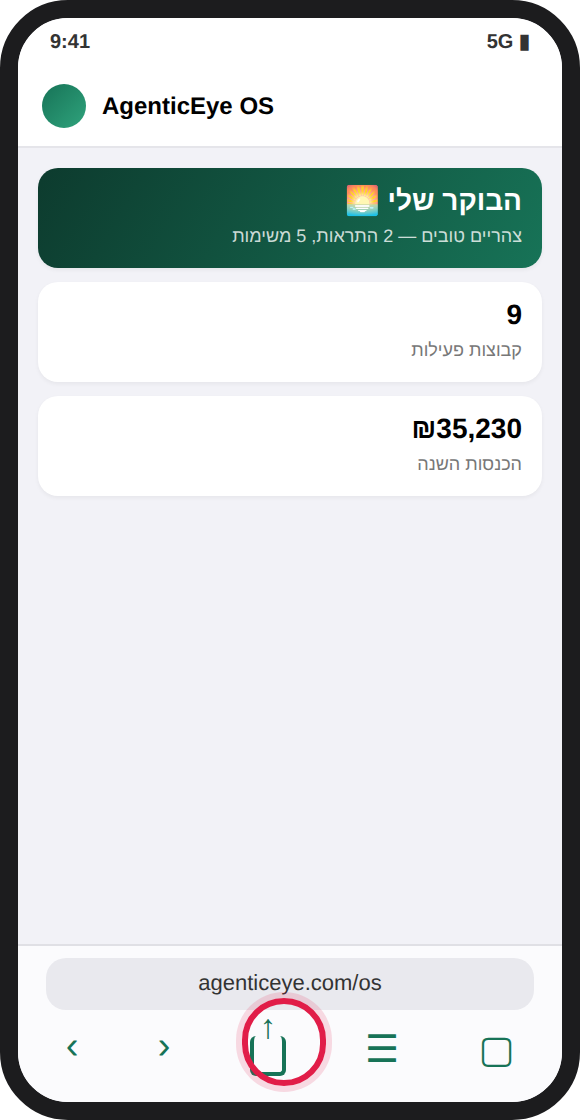
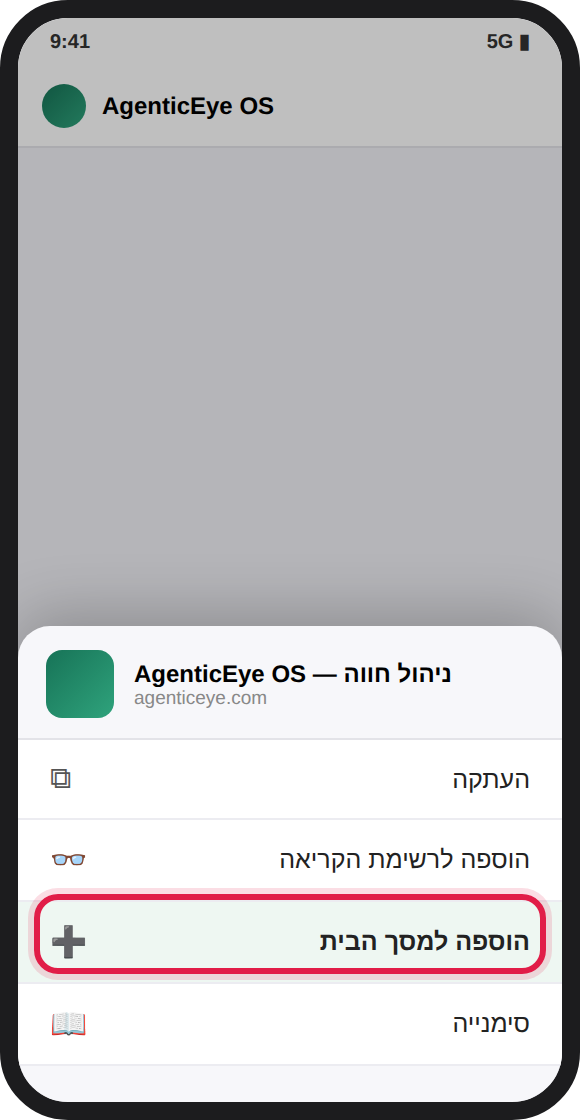
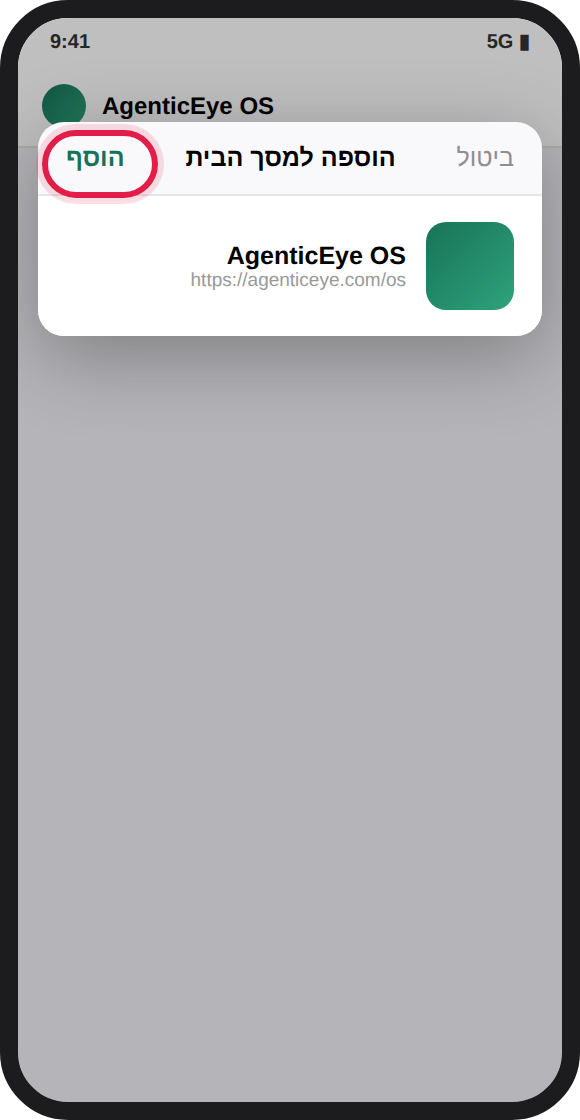
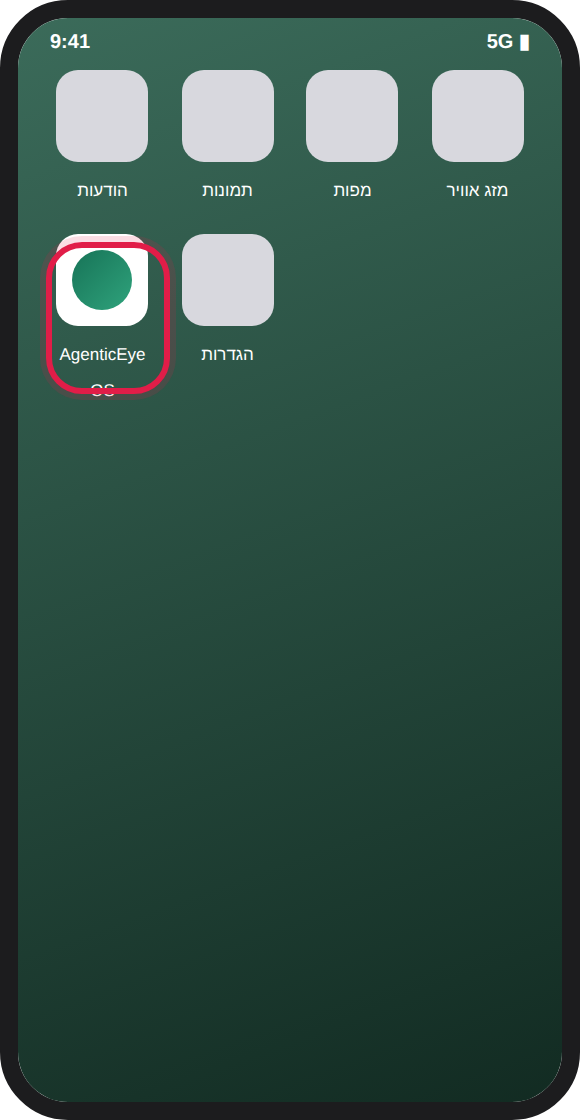
💡 באייפון חובה להשתמש בספארי (בכרום לאייפון אין "הוספה למסך הבית" מלאה), והתראות Push עובדות רק אחרי ההתקנה (iOS 16.4 ומעלה).
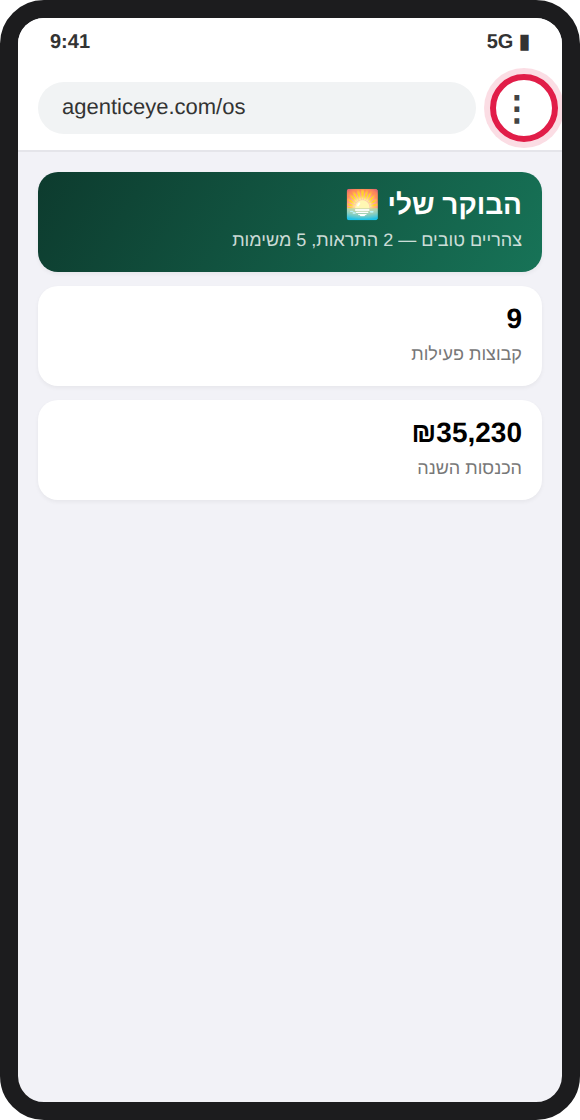
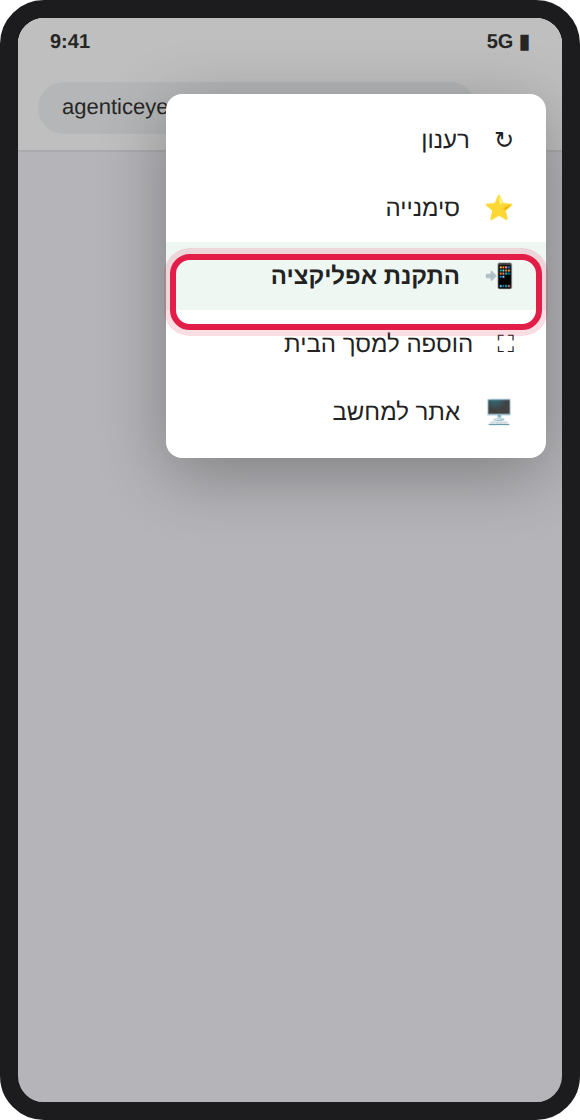
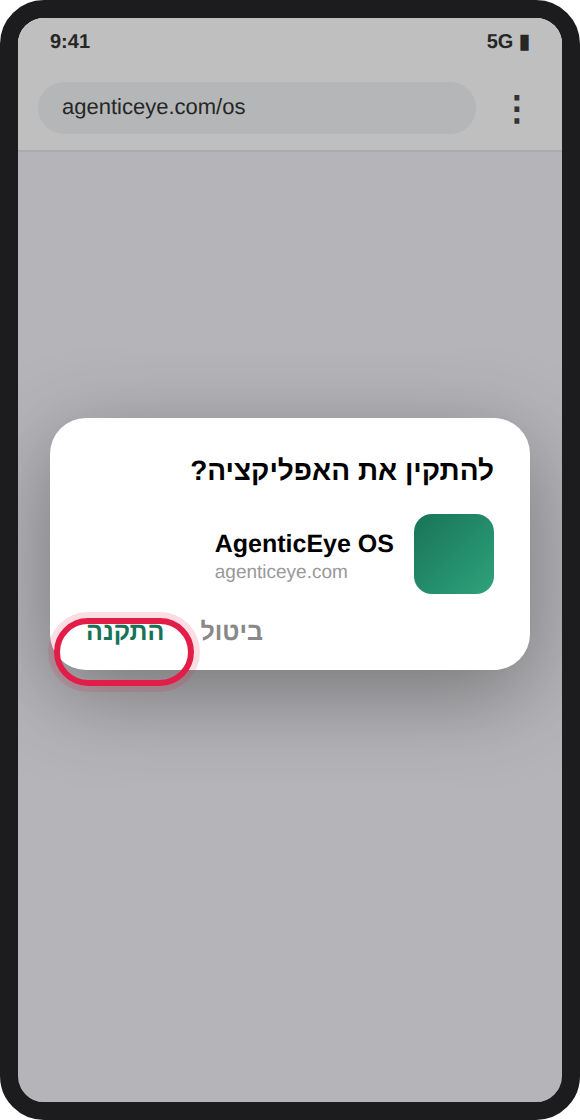
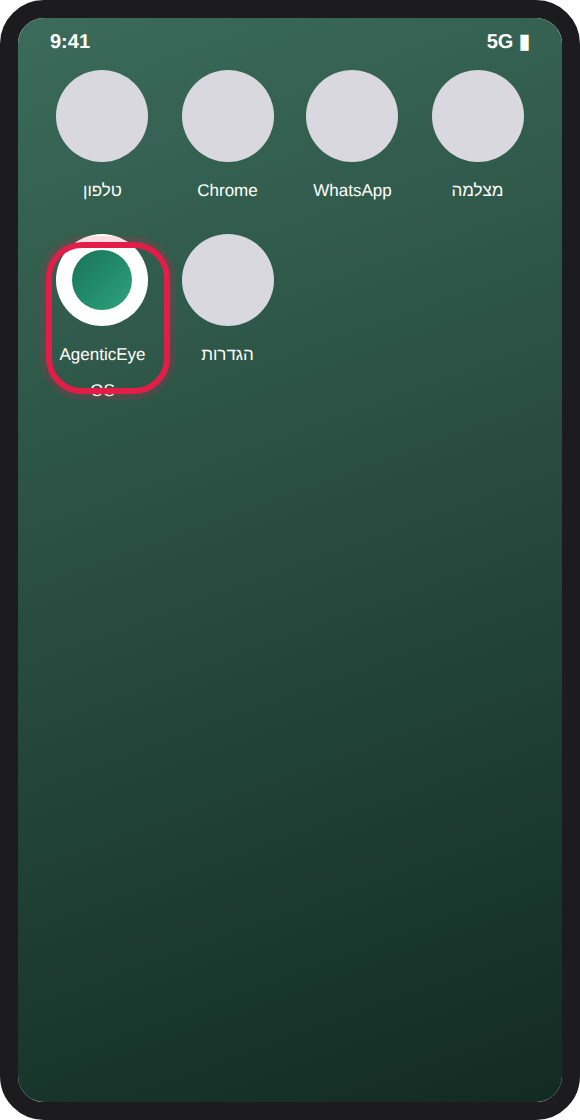
מסמכים משפטיים: התנאים הכלליים של הפלטפורמה ותוכנית שותף העיצוב ומדיניות הפרטיות (מה נאסף, ספקי המשנה, תקופות שמירה, מצלמות ועובדים, זכויות) מתפרסמים בעברית ובאנגלית עם מספר גרסה ותאריך תוקף; קישורים אליהם נמצאים בתחתית תפריט הצד ובמסך הכניסה.
הדשבורד הוא מסך הפתיחה: שישה מדדי-על (מחזורים פעילים, עופות חיים, תמותה, מזון, התרעות, הכנסות), כרטיס "תוכנית הרווח להיום" — הפעולות ששוות הכי הרבה כסף עכשיו (שיווק בזמן, הזמנת מזון, מו"מ על מחיר תערובת, טיפול בקריטיות) ממוינות לפי שווי כספי, סיכום AI יומי בשפה חופשית, מצב כל הלולים עם פס התקדמות מחזור, וגרפים חיים: מים מול מזון, תמותה יומית, עקומת משקל מול תקן הגזע ופילוח הוצאות. שלוש הפעולות המובילות מגיעות גם לדיג'סט הבוקר ב-WhatsApp.
המוח מנתח ברציפות את כל הדאטה — מים, מזון, תמותה, משקל, אקלים — ומזהה סימנים מוקדמים לנזק לפני שהוא קורה:
מדד סיכון 48 שעות — המוח שצופה קדימה: מודל רב-סמנים שמשקלל את כל הסמנים המקדימים הידועים — קפיצת שתייה (הסמן החזק ביותר, 24–48 שעות לפני אירוע), ירידת צריכת מזון, האצת תמותה, יחס מים/מזון חריג, פיגור משקל ועומס אקלים — לציון 0–100 לכל להקה. ציון 60+ מייצר התרעה עם הסיבות המדויקות, צפי הנזק בעופות ובכסף, והמלצה לבדיקה פיזית מיידית. המדד מוצג בדשבורד ומוזן לתוכנית הרווח היומית.
תחזית מזג אוויר לפי מיקום הלול: כשמגדירים לחווה קואורדינטות (בהגדרות), המערכת מושכת תחזית 5 ימים למיקום המדויק של הלולים. המוח משווה כל יום בתחזית לטווח הנוחות שיהיה לכל להקה בגיל שלה באותו יום — ומייצר התרעות היערכות לחום או קור עד 3 ימים מראש, עם המלצות מעשיות (בדיקת מאווררים וערפול לפני גל חום, תנורים וגז לפני קור). יום מסוכן מסומן בדשבורד, ופעולת ההיערכות נכנסת לתוכנית הרווח היומית.
ראייה ממוחשבת ושליטה דו-כיוונית: מצלמות AgenticEye שולחות אירועי זיהוי — ספירת עופות, שקילה ויזואלית, זיהוי פגרים והתנהגות חריגה — והמוח מצליב אותם מול הרישום: פער ספירה מעל 3% או פיגור משקל מעל 10% מייצרים התרעה. במקביל, ערוץ הפקודות הדו-כיווני מאפשר לשלוח פקודות לבקרים (טמפרטורה, מאווררים, וילונות) עם אישור ביצוע ותיעוד מלא. פירוט במסכי "מכשירים" ו"חיבורים".
לחיצה על "סריקת מוח עכשיו" הופכת את התובנות להתרעות אמיתיות במרכז ההתרעות (עם מניעת כפילויות של 24 שעות).
פידבק על התרעות — והמוח באמת לומד: ליד כל התרעה יש 👍/👎 — סמנו אם ההתרעה הייתה מדויקת או לא רלוונטית (אפשר להוסיף גם למה). זה לא רק נאסף: סוג התרעה שסומן 👎 שלוש פעמים ומעלה (ורוב המשוב עליו שלילי) מפסיק להישלח בחווה שלכם אוטומטית — התרעות קריטיות תמיד עוברות, וסימון 👍 מחזיר סוג שהושתק. ההשתקה מתועדת בציר הזמן, כך שתמיד רואים מה המוח למד.
ניטור תפעולי (Watchdog): המוח מתריע גם על מה שחסר — יומן שלא הוזן יומיים, בקר/חיישן ששתק מעבר לתדירות הצפויה, וציוד שמסומן תקול (גנרטור תקול = קריטי). בנוסף, בכל אכלוס חדש נוצרת אוטומטית תוכנית גידול כמשימות מתוזמנות: צ׳ק-ליסט קליטה, חיסונים, שקילות שבועיות ובדיקת טרום-שיווק — מותאם לוורטיקל. 📚 מדריכי הגידול המקצועיים: agenticeye.com/os/guides
סריקה אוטומטית: המוח סורק את כל החוות עם להקות פעילות כל 30 דקות ברקע — גם בלי להיכנס למערכת. שורת הסטטוס בפאנל המוח בדשבורד מציגה את מועד הסריקה האחרונה. בנוסף נשלח דיג'סט בוקר יומי ב-WhatsApp לאנשי הצוות (תמותה, מזון, מים, התרעות פתוחות ותוכנית הרווח להיום), ודוח שבועי אוטומטי בכל יום ראשון בבוקר — השבוע מול שבוע קודם, כסף, ושלוש הפעולות לשבוע הקרוב. כל הודעה שנשלחת נרשמת בציר הזמן.
התראות Push לנייד: בהגדרות ← "התראות Push" מפעילים התראות במכשיר — התרעות קריטיות מהמוח מגיעות למסך הנייד גם כשהאפליקציה סגורה. עובד הכי טוב כשהאפליקציה מותקנת למסך הבית (PWA).
כל מחזור נפתח עם קליטת אפרוחים: ספק, כמות בהזמנה, כמות שנקלטה בפועל (חשוב! כאן נתפס פער הספירה), מחיר לאפרוח ומשקל יעד.
בלחיצה על מחזור נפתח דף מלא: גיל, חיים, תמותה, משקל מול תקן, FCR ו-EPEF, קצב גדילה יומי (ADG), תחזית שיווק (כמה ימים למשקל היעד, תאריך משוער, הכנסה ורווח צפויים), גרפים, כלכלת המחזור המלאה (הכנסות מול אפרוחים+מזון+טיפולים+הוצאות) ופעולות מהירות.
שגרת הבוקר: מסך אחד עם כל הלולים הפעילים בטבלה אחת. מזינים תמותה, ברירה, משקל, מזון, מים, טמפרטורות ולחות — ולוחצים "שמירת הכל". רק שורות שמולאו נשמרות, והזנה חוזרת באותו יום מעדכנת (לא מכפילה).
לולים: כרטיס לכל מבנה — קיבולת, סוג, בקר, סטטוס (פעיל/ריק/בניקוי) והמחזור הנוכחי.
בקרה וסביבה: לכל לול — טמפרטורה, לחות, CO₂ ואמוניה בגרפים של 48 שעות, עם קריאה ידנית או אוטומטית מהחיבורים. אמוניה מעל 20ppm מסומנת מיד.
מכשירים: רישום כל ציוד החווה — בקרים, מצלמות, משקלים, גנרטורים, חיישנים — עם סטטוס (פעיל/תקול/מנותק). גנרטור תקול = התרעת עדיפות עליונה.
חיבורים וחיישנים: כאן מחברים את המוח לעולם האמיתי. כל מקור נתונים נתמך:
לכל חיבור: תדירות משיכה, סטטוס, הודעת סנכרון אחרונה וכפתור "סנכרן עכשיו". הנתונים זורמים ישירות למסך הסביבה ולתובנות.
חיבור בקר אמיתי (Push API): לכל חיבור עם לול ו-API Key יש כתובת הזרמה ייחודית — הבקר או הגשר שולח POST פשוט עם temp/humidity/co2/nh3 (בודד או batch) והקריאות נכנסות ישר למערכת ולמוח. לוחצים 📡 ליד החיבור לקבלת הכתובת, הטוקן ופקודת curl לדוגמה.
עין המצלמה — ספירה ושקילה ויזואלית: מצלמות AgenticEye (או כל edge box) שולחות אירועי זיהוי לכתובת /v1/os-ingest/<חיבור>/vision עם אותו טוקן: ספירת עופות (count), שקילה ויזואלית (weight בגרמים), זיהוי פגרים (mortality) והתנהגות חריגה (behavior) — כל אירוע עם רמת ביטחון. האירועים מוצגים במסך המכשירים, והמוח מצליב אוטומטית: ספירת מצלמה נמוכה מהרישום ביותר מ-3% ← התרעת פער; משקל ויזואלי שמפגר מעל 10% מתקן הגזע ← התרעת גדילה.
אינטגרציית משחטה — תוצאות שחיטה ישר ל-P&L: חיבור מסוג "משחטה" מאפשר למשחטה (או לגשר ה-ERP שלה) לדחוף תעודות שחיטה לכתובת /v1/os-ingest/<חיבור>/plant-results: עופות, משקל כולל, מחיר לק"ג, פסילות ומספר תעודה. כל משלוח נרשם אוטומטית כמכירה על הלהקה הנכונה (זיהוי לפי קוד להקה, לפי הלול או הלהקה האחרונה) — נכנס להכנסות, למנוע הרווח ולמדד הפסילות בלי הזנה ידנית. מספר תעודה מונע כפילויות, וכל משלוח מתועד בציר הזמן. משלוח עם אחוז פסילות חריג מייצר התרעת איכות מיידית עם הערכת האובדן — עוד לפני שמישהו פתח את הדוח.
שליטה דו-כיוונית בבקרים: במסך החיבורים, "פקודות לבקר" — בעלים או מנהל שולחים פקודה (טמפרטורת יעד, מאווררים, וילונות, תאורה, קו האכלה או פקודה מותאמת), היא נכנסת לתור פקודות עם סטטוס מלא: ממתינה ← נשלחה ← בוצעה/נכשלה. סוכן הבקר מושך פקודות ממתינות מ-GET /commands ומאשר ביצוע ב-/ack — וכל פקודה ותוצאתה מתועדות בציר הזמן של החווה.
המוח סוגר את המעגל — אוטומציית אקלים אמיתית: כשחוק אקלים (מאווררים/חימום) נמצא במצב "אוטומטי" ולבקר של הלול יש חיבור דו-כיווני פעיל, המוח לא מסתפק בהתרעה: טמפרטורה מעל טווח הנוחות לגיל ← פקודת הפעלת מאווררים נכנסת לתור אוטומטית; מתחת לטווח ← העלאת יעד חימום. כל פעולה כזו מסומנת 🤖, מייצרת התרעת "המוח פעל" ורישום בציר הזמן, מוגבלת לפקודה אחת לכל לול ל-6 שעות, וניתנת לביטול כל עוד היא ממתינה. חוק במצב "המלצה" משאיר את ההחלטה אצלכם — המוח רק ממליץ. אם חוק אוטומטי מוגדר אבל אין חיבור דו-כיווני, תקבלו התרעה שמסבירה מה חסר.
מודול האופטימיזציה נותן המלצות מעשיות לכל מכשיר, מבוססות על הדאטה החי מול תקני הגזע:
כל המלצה מציגה השפעה צפויה (חיסכון/תפוקה) וכשאפשר — כפתור "צור חוק אוטומציה". חוק אוטומציה מוגדר עם טריגר ("מתי") ופעולה ("מה"), במצב המלצה בלבד או אוטומטי, וכל הרצה נרשמת ביומן ההתרעות.
שורה לכל מחזור: תמותה, FCR, EPEF, הכנסות, עלויות לפי רכיב, עלות לק"ג ורווח — עם חצי בנצ'מרק מול ממוצע החווה (▲ טוב מהממוצע). בנוסף: גרף הוצאות חודשי, סיכומי-על, ייצוא CSV והדפסה.
מסך "רווח ו-ROI" (בתפריט, קבוצת "עסקי", וגם בכרטיס הירוק בדשבורד) מוכיח במספרים כמה יותר רווח החווה עושה עם המערכת מול חווה זהה שמנוהלת ללא ניטור רציף:
הדפסה מפיקה דוח ROI נקי למשקיע או לבנק. אותו מנוע מזין גם את שורת "מנוע הרווח" בסיכום ה-AI היומי.
כרטיס "תחזית תזרים" במסך הרווח מציג שבוע-אחר-שבוע את הכסף שנכנס (שיווק להקות לפי תחזית ההגעה למשקל, ובמטילות הכנסת ביצים שוטפת) מול הכסף שיוצא (מזון לפי עקומת הגזע במחירי האספקות בפועל + תפעול לפי הקצב הנוכחי) — נטו ומצטבר, עם גרף עמודות וסימון השבוע שבו התזרים המצטבר הכי נמוך. חווה יכולה להיות רווחית על הנייר ועדיין לפספס תשלום מזון — הכרטיס הזה מראה את הבור לפני הבנק. אם התחזית יורדת למינוס, המוח פותח התרעה מראש — אפשר להקדים שיווק, לפרוס הזמנת מזון או לדחות הוצאה לא דחופה.
מחזור שסומן "שווק" או "נסגר" מקבל בדף הלהקה תעודת ציון A–E: כל מדד סופי — FCR, תמותה מצטברת, EPEF, פסילות משחטה ועלות ייצור לק"ג — נמדד מול קו הבסיס הענפי ומקבל ציון 0–100, והממוצע המשוקלל קובע את הציון. התעודה משווה גם לממוצע המחזורים הקודמים שלכם (כולל רווח-לעוף), והמוח מפרסם אותה אוטומטית בציר הזמן עם המדד החזק והמדד שכדאי לשפר במחזור הבא. כך כל סגירת מחזור הופכת לתוכנית עבודה של המחזור הבא.
שלושה מנגנונים שסוגרים את הפער בין "המערכת ידעה" ל"מישהו טיפל": התרעה קריטית ⇒ משימה — כל התרעה קריטית פתוחה הופכת אוטומטית בסריקת המוח למשימה בעדיפות גבוהה עם יעד למחר, משויכת לעובד האחראי על אותו מבנה (כשההרשאות מוגדרות). הוצאה חריגה — קטגוריית הוצאה שרצה 40%+ מעל הממוצע שלה ב-30 הימים האחרונים מקבלת התרעה עם הפער בשקלים ושלוש הסיבות הנפוצות לבדיקה (תקלה שצורכת, עליית מחיר, רישום כפול). מודיעין מים — מעבר לקפיצות ולירידות החדות שכבר מנוטרות, המוח מזהה עכשיו גם נזילה שקטה (יחס מים/מזון גבוה יומיים ברצף כשהמזון תקין — מים שיוצאים מהקו בלי לעבור מקור, שגם מרטיבים רפד ומייצרים פסילות) וגם תת-שתייה (יחס נמוך יומיים — עופות ששותים פחות מפסיקים לאכול יום-יומיים אחר כך; הסמן המוקדם והזול ביותר לתחלואה).
במסך "מחזורי גידול", המתכנן מזהה לולים פנויים או כאלה שמתפנים בתוך שלושה שבועות, ומחשב לכל אחד את תאריך האכלוס המומלץ: תאריך האכלוס קובע את חודש השיווק, ועקומת העונתיות (ממודיעין המחירים) אומרת כמה כל חודש שווה. ההמלצה כנה — המתנה מוצעת רק כשהרווח מהמחיר הגבוה עולה בבירור על עלות הלול הריק בינתיים; אחרת ההמלצה היא לאכלס מוקדם ככל האפשר, כולל הסכום נטו של כל החלטה.
המדגרה קובעת את השבוע הראשון, והשבוע הראשון קובע את המחזור. הכרטיס מקבץ את כל הלהקות לפי ספק האפרוחים ומציג לכל מדגרה: תמותת שבוע ראשון (חתימת איכות האפרוחים), תמותה סופית, FCR ורווח לעוף — עם 🏆 לספק המוביל. פער עקבי בין ספקים הוא כלי מו"מ מול המדגרה, או סיבה מבוססת-מספרים להחליף.
בכרטיס כל חווה במבט-העל מופיעה טבעת ציון 0–100 שמסכמת את מצב החווה במספר אחד: התרעות קריטיות פתוחות, להקות בסיכון 48 שעות, איכות הדאטה, תמותה מול תקן הענף, תחזית התזרים והמלאי הרפואי. ריחוף על הטבעת מראה בדיוק אילו רכיבים מורידים נקודות — כך שהציון הוא לא רק מדד אלא רשימת משימות. ירוק = 85+, כתום = דורש תשומת לב, אדום = לטפל היום.
במסך "לולים", כרטיס ההשוואה מציג לכל מבנה את ממוצע המחזורים שהסתיימו בו: FCR, תמותה, EPEF ורווח-לעוף — עם סימון המבנה המוביל 🏆 והמבנה שמדמם. הפער ביניהם מתורגם לשקלים בשנה: "אם לול 4 היה מרוויח לעוף כמו לול 1 — עוד X ₪ בשנה". אותה חווה, אותו מזון, אותן משאיות — פער עקבי בין מבנים הוא כמעט תמיד תשתית (אוורור, שתייה, בידוד, צפיפות), והסכום שבכרטיס הוא תקציב הבדיקה והשיפוץ.
במסך "מכירות ושיווק", כרטיס המחירים מציג את המחיר הממוצע המשוקלל לחודש מכל המכירות בפלטפורמה באותו ורטיקל (אנונימי לחלוטין) — מול החודשים שבהם אתם מכרתם. רואים עונתיות (החודש החזק בשנה), עמודות עם מסגרת אדומה בחודשים שבהם מכרתם מתחת לממוצע הענפי, והערכת מגמה לחודש הבא (משוקללת משלושת החודשים האחרונים — מגמה סטטיסטית, לא הבטחת מחיר). ביחד עם "תזמון שיווק" במסך הרווח זו תמונת ההחלטה המלאה: מתי לשווק ובאיזה מחיר סביר.
במסך "בריאות וטיפולים", טבלת המלאי הרפואי מנהלת את כל מה שבמקרר ובמחסן: שם, סוג (חיסון/תרופה/תוסף/חיטוי), כמות ויחידה, מלאי מינימום, תאריך תוקף, מספר אצווה וספק. המוח שומר על המלאי בכל סריקה: פריט שפג תוקפו מקבל התרעה קריטית ("להוציא מהמלאי — אסור להשתמש"), תוקף שמתקרב (30 יום) מקבל אזהרה לתעדף שימוש או להזמין חלופה, ומלאי שירד מתחת למינימום מקבל תזכורת הזמנה. חיסון שנתקע בגלל בקבוק פג או ריק עולה חלון חיסוניות של להקה שלמה — 30 יום של התראה מראש עולים כלום.
שני כרטיסים במסך הרווח שסוגרים את סיפור ההתייעלות: בקרת איכות דאטה — המוח מבקר את הרישום כמו מנהל חשבונות: חורים ביומן, שדות שאף אחד לא ממלא (משקל, מים, ביצים), חשדות לשגיאות הקלדה (תמותה פי 5 מהחציון, משקל שיורד, יחס מים/מזון בלתי אפשרי) — עם ציון 0–100 ורשימת תיקונים קונקרטית; חשד משמעותי מייצר גם התרעה באותו יום, כי מספר שגוי מרעיל בשקט כל תחזית וכל חישוב רווח. חיסכון בכוח אדם — כמה שעות עבודה המערכת חסכה בפועל ב-30 הימים האחרונים: הנהלת חשבונות אוטומטית, הזמנות מזון, פעולות אקלים, ניטור רציף, רישום דיגיטלי ודוחות מוכנים — מומרות לשקלים לפי עלות מעסיק ולאחוז משרה. נמדד מהמערכת, לא מובטח.
מסך "דוח שבועי" (בתפריט, קבוצת "עסקי") מרכז את כל השבוע בעמוד אחד מוכן להדפסה: תמותה, מזון וביצים מול השבוע הקודם (עם חצים ירוקים/אדומים לפי כיוון המגמה), הכנסות והוצאות השבוע, טבלת מצב לכל להקה (משקל מול תקן, תמותה ומזון שבועיים), תמונת מנוע הרווח, להקות בסיכון לפי מדד ה-48 שעות, אזהרות מזג האוויר קדימה, ו"מה הכי חשוב לשבוע הקרוב" מתוכנית הרווח. כפתור ההדפסה מפיק PDF נקי — מושלם לשליחה שבועית לשותפים או לבנק.
הרשאות מתקדמות: לכל משתמש אפשר להגדיר, מעבר לתפקיד (בעלים/מנהל/עובד/צפייה), גם לולים מורשים (יראה ויזין רק אותם) ו-מודולים מורשים (התפריט שלו יציג רק אותם, והשרת אוכף כתיבה במודולים העסקיים). כפתור ⚙ ליד כל משתמש פותח את מסך ההרשאות. לא סימנתם כלום = גישה מלאה.
מודל SaaS מלא בשלוש רמות:
יצירת משתמש: צוות והרשאות ← "משתמש חדש" ← אימייל, סיסמה ותפקיד בחווה. המשתמש נכנס עם הפרטים האלה ב-agenticeye.com/os.
בהגדרות ← "משתמשים והרשאות": כל משתמשי הארגון בטבלה אחת — אישור הרשמות חדשות (סטטוס "ממתין לאישור"), השהיה או חסימה של חשבון (מנתקת אותו מיידית), שינוי תפקיד, ובחירת אילו חוות כל משתמש רואה ובאיזה תפקיד (בעלים/מנהל/עובד). ללא סימון חוות — המשתמש רואה את כל חוות הארגון. אותו ניהול קיים גם בפאנל הניהול הראשי (עמודות Status ו-Farms).
המערכת מוצעת בשלוש תוכניות: בסיסית (ניהול יומיומי לחווה אחת), מתקדמת Pro (כל שכבת הרווח: כספים, תזרים, השוואות, מתכנן, מוח, AI ודוחות) ו-ארגונית Enterprise (הכל ללא הגבלה, כולל חיבור בקרים, API ודומיין ממותג). כל הרשמה חדשה מתחילה ב-30 ימי ניסיון חינם ברמת Pro. את התוכנית הפעילה, הימים שנותרו והתוקף רואים בהגדרות ← "התוכנית והרישיון"; מודול נעול 🔒 בתפריט שייך לתוכנית גבוהה יותר. רישיון שפג חוזר אוטומטית לתוכנית הבסיסית — הנתונים נשמרים תמיד.
ודאו שנבחרה החווה הנכונה בסרגל הצד, ושהמיגרציה הופעלה בפאנל הניהול (Migrations ← Deploy).
דוחות ורווחיות ← הדפסה (נפתח דיאלוג הדפסה נקי) או ייצוא CSV לאקסל.
סוגי המזון בטפסי האספקה, ההזמנה וסריקת המסמכים מגיעים מסוג החווה: לולים מקבלים סטרטר/גדילה/גמר, ומשק חי וגן חיות מקבלים חציר, תחמיץ, תערובת גרעינים, פלטים, ירקות ופירות, בשר, דגים, חרקים, ענפים ועלים ותוספי תזונה. כפתור "⚙️ ניהול סוגי מזון" במסך המזון מאפשר למנהל להוסיף סוגים משלו לכל חיה, קבוצה או ספק — והם מופיעים מיד בכל הטפסים. ובנוסף, המערכת חוגגת אתכם: קונפטי והודעת עידוד על כל שמירת יומן, סיום משימה, הזנה מהירה וסגירת התרעה; צ׳יפ רצף הזנה 🔥 במסך היומן שסופר ימים רצופים עם נתונים (עם שיא אישי); ומדליות 🥉🥈🥇🏆 על הציון החודשי של כל עובד — שפה שכולם מבינים.
הדשבורד פותח את היום עם ברכה אישית ("בוקר טוב, יוסי! ☀️") לפי שעת היום. אבני דרך 🎖️ נחגגות פעם אחת בדיוק — המשימה הראשונה, המכירה הראשונה, הקליטה הראשונה, אספקת המזון הראשונה, הטיפול הראשון, הדיווח הראשון מהשטח, התמונה הראשונה בגלריה וסיום אשף ההקמה — וכל שמירה נוספת עדיין מקבלת חגיגה קטנה עם אימוג׳י מותאם (💰 מכירה, 🌾 מזון, 🐣 להקה). במסך היומן, צ׳יפ התקדמות 📝 מראה כמה להקות הוזנו היום מתוך הסך ("3/5 הוזנו היום") — השלמת כולן שווה רגע של 🏅 "יום מושלם", ורצף הזנה שמגיע ל‑7, 14, 30, 60 או 100 ימים זוכה לחגיגת רצף 🔥 מיוחדת.
בראש הדשבורד — רצועת "מדדי ה-24 שעות הקריטיים": 💧 צריכת מים ו-🌾 מזון (היום מול אתמול, סטייה גדולה מודגשת), 🌡️ טמפרטורה (חיישן אם מחובר, אחרת מהיומן) ו-📷 תמונת מצב הלהקה מניתוח התמונה האחרון. במסך המחזורים — 🐣 פיצול אכלוס: הזמנה אחת ("קיבלתי 120,000 עופות") הופכת ללהקות שוות בכמה לולים בטופס אחד, עם קוד אצווה משותף ושדה "סה״כ בהזמנה" שמוצג ליד כל להקה — והתמותה יורדת מהלול הספציפי; כפתור 📑 משכפל להקה קיימת. ביומן היומי — עמודת הלהקה קפואה בגלילה הצידה, המחזורים מסודרים לפי סדר הלולים ההגיוני, ונוספה עמודת טמפ׳ ממוצעת. העוזר החכם מפנה רק לשמות מסכים אמיתיים, ושמות לולים, התרעות ומרכז העזרה מתורגמים אוטומטית לשפת המשתמש. מאגר הרגולציה הועשר בערכי הסף המדויקים (אירופה, ישראל, ארה״ב) ובבלוק 🌍 עם 11 מדדי התוצאה של WOAH.
המסך "מניעת נזק והוכחה" הוא שכבת ההוכחה של המערכת. כל התרעה שנסגרת מרכיבה אוטומטית תיק אירוע: מה זוהה ומתי (עם קריאות החיישן בחלון האירוע), מי קיבל הודעה ובאיזה ערוץ — עם חותמת זמן ומצב מסירה, מי אישר ותוך כמה זמן, אילו משימות ופקודות בקר נפתחו, מה נעשה בפועל (שדה שנשאל ברגע הסגירה), והאם התמותה והצריכה השתפרו אחרי ההתערבות. כפתור 🖨️ מייצא את התיק ל-PDF ממותג. כל תיק נחתם ב-SHA-256 משורשר לתיק הקודם, וכפתור "אימות שרשרת" מזהה כל שינוי בדיעבד. במסך גם פנקס נזק שנמנע — כמה כסף נחסך, לפי חודש וסוג אירוע — וזמני תגובה (MTTA/MTTR) לפי חומרה, כולל מי בצוות מטפל בפועל.
כרטיס "⚖️ משקל חכם" במסך הלהקה מאחה ארבעה אומדנים בלתי-תלויים — עקומת הזן, השקילה הידנית האחרונה, אומדני המצלמות (אחרי תיקון כיול נלמד) והמשקל הנגזר מהמזון שנאכל — למשקל משוער אחד עם רווח ביטחון, אחידות (CV%) ותחזית Gompertz למועד משקל היעד. סוכן כיול המשקל מצליב כל לילה מצלמות מול מאזניים, לומד סטיות ומתריע על מצלמה שדורשת כיול; שריון חריגים מונע ממספר שגוי-אך-בטוח לגרור את האומדן. ולחוות בלי מצלמות — 📸 שקילה בצילום מהיומן היומי: צילום עילי של הלהקה (מדבקת ה-QR כעוגן קנה-מידה) הופך לאומדן משקל שנכנס לאיחוי.
⚡ חזרה מיידית — כשחוזרים למסך שכבר הייתם בו, הוא מצויר מיד מהתמונה האחרונה שלו במקום שלד טעינה; הנתונים הטריים מחליפים אותה תוך פחות משנייה. בזמן הזה המסך מעומעם קלות ולא ניתן ללחיצה, כדי שלא תלחצו על כפתור שעדיין לא חובר. 📴 קריאה בלי רשת — כל מסך שנטען בהצלחה נשמר במכשיר לשבוע. אם נכנסים ללול ואין קליטה, המסך כבר לא נופל לשגיאה: מוצגים הנתונים האחרונים שנשמרו, ובראש המסך פס שאומר בדיוק את זה ומאיזה זמן הם. שגיאת שרת אמיתית (למשל אין הרשאה) עדיין מוצגת כשגיאה — רק חיבור מת נופל לנתונים השמורים. 🔄 חזרה אוטומטית — ברגע שהחיבור חוזר, המסך מתעדכן לבד ומופיעה הודעה קצרה. ⚠️ מסך שנכשל אינו מבוי סתום — במקום שורת שגיאה יבשה מופיע כרטיס עם הסבר, כפתור "נסה שוב", וכפתור "הצג את הנתונים האחרונים" אם יש עותק שמור. ההודעה מבחינה בין אין־אינטרנט לבין תקלה אמיתית ואומרת מה לעשות.
למערכת יש עכשיו דלת רשמית למכונות: `/v1/platform`. כל מה שאדם עושה במסכים, תוכנה יכולה לעשות דרכה — לקרוא כל מודול, לכתוב בחזרה, לשאול שאלות בשפה חופשית, לבצע פעולות ולקבל אירועים בדחיפה. 🔑 מפתחות — נוצרים בפאנל האדמין במסך "API וגישת מוח": בוחרים הרשאות (קריאה, כתיבה, שאלות AI, ביצוע פעולות, ניהול), אפשר להגביל מפתח לחוות מסוימות, לקצב בקשות לדקה ולתאריך תפוגה, ולבטל בלחיצה. המפתח מוצג פעם אחת. כל קריאה נרשמת ביומן (מי, מה, מתי, כמה זמן) שנראה באותו מסך. 📊 ארבע השאלות שמוח באמת שואל — `GET /context` מחזיר את כל החווה באובייקט אחד מוכן להזנה למודל (מבנה, להקות עם גיל ותמותה ומשקל מול תקן, התראות, משימות, אנשים, ציוד, כסף 90 יום, וגם נרטיב במילים); `GET /insights` מחזיר 15 מקטעי תובנה שכבר מחושבים במערכת (תוכנית פעולה, ציון בריאות, רווח, דליפות, בנצ'מרק, חיסכון בעבודה, מחירי שוק ומזון, תזרים, השוואת לולים, תכנון אכלוס, ספקים, מזג אוויר, משקל חכם, וסיכונים עם תיקים חתומים); `GET /gaps` מחזיר את מה שחסר — לולים בלי רישום היום, שאלות עובדים שלא נענו, התראות פתוחות מעל 3 ימים, להקות בלי שקילה שבוע, תרופות שפג תוקפן, חיבורים תקולים — כל אחד עם דרך התיקון; `GET /digest` הוא תדריך הבוקר כדאטה. 🧱 32 משאבים — כל מודול במערכת (חוות, לולים, להקות, יומן, התראות, משימות, דיווחים, גלריה, מכשירים, חיבורים, סביבה, ראייה, אוטומציות, מזון, הוצאות, מכירות, טיפולים, תרופות, אנשי קשר, מכרזים, הזמנות, משתמשים ועוד) עם אותה צורה: סינון, טווחי תאריכים, חיפוש, מיון ודפדוף. 🤖 שאלה ופעולה — `POST /ask` שואל בשפה חופשית בכל אחת מ-5 השפות, `POST /actions` מבצע פעולה מאושרת בלי מודל בלולאה, ולכל פעולה יש ביטול. 🔔 Webhooks — במקום לדגום, נרשמים לאירועים (התראה קריטית, שאלה מהשטח, דיווח, משימה, מכירה) ומקבלים אותם תוך שניות עם חתימת HMAC לאימות. 🚪 ומה שלא מכוסה — `/v1/platform/os/*` מעביר לכל אחד מ-200+ מסלולי ה-OS עם ההרשאות של המפתח, כך שה-API אף פעם לא מפגר אחרי האפליקציה. תיעוד מלא ומקושר: /api-docs/ — מדריך דו-לשוני עם דוגמאות להעתקה; ולמכונות /v1/platform/capabilities ו-/v1/platform/openapi.json.
🕰️ מאז הביקור האחרון — כשחוזרים למערכת אחרי יותר מ-20 דקות מופיע בראש הבית / הדשבורד / הבוקר שלי כרטיס קצר עם מה שהשתנה: התראות קריטיות וחדשות, התראות שנפתרו, משימות חדשות (ומה מהן שלי), משימות שהושלמו, שאלות מהשטח שמחכות, דיווחים, מכירות, הוצאות, משלוחי מזון, תמונות, רישומי יומן והודעות מאלברט. הכרטיס מותאם לממשק (הנהלת חשבונות רואה כסף, עובד שטח רואה משימות ודיווחים), כל שורה היא כפתור למסך המתאים, ו-✕ סוגר עד הביקור הבא. 📱 תמיד מלוטש בטלפון — נוסף מנגנון קבוע בשלוש שכבות: (1) כללי CSS שמונעים ממספרים גדולים, תגיות ארוכות, גרפי עמודות וכותרות לחרוג מרוחב המסך; (2) "שומר התאמה" בזמן ריצה שבודק אחרי כל ציור בטלפון אם משהו גולש מהמסך — מספר או כותרת מוקטנים בהדרגה עד שהם נכנסים, שורה רחבה (למשל 12 מחזורים בגרף) הופכת לפס גלילה, ואם משהו בכל זאת נשבר נשלח דיווח אוטומטי לאדמין (מסך "שימוש ותמיכה", שגיאת layout_overflow) עם המסך והרכיב המדויקים; (3) סקריפט ביקורת (scripts/mobile-audit.js) שעובר על כל המסכים ברוחב 390 ו-360 פיקסלים ומדווח על כל גלישה או טקסט חתוך — מורץ לפני כל גרסה. גם שורת הכפתורים העליונה סודרה כך שכפתור המשתמש לא נחתך יותר בטלפונים צרים. 🏢 ממשק "מנהל אזור" — למי שמנהל כמה חוות: מבט-על, התראות, דשבורד, רווח, דוח שבועי, משימות ואנשי קשר, עם "צעדים ראשונים" משלו. באדמין: כל מסך מציג שלד טעינה במקום פאנל ריק בפתיחה הראשונה.
🎓 אלברט לפי ממשק — אלברט יודע באיזה ממשק אתם עובדים ומתאים את עצמו: בממשק "פשוט וגדול" הוא עונה במשפטים קצרים ובלי ראשי תיבות ומציע פעולה אחת ברורה; ל"עובד שטח" הוא מדבר פשוט, בלי כסף וניתוחים, ומציע דיווח, הזנה מהירה או משימה; ל"הנהלת חשבונות" הוא מדייק בסכומים וספקים ומציע סריקת חשבונית; ל"בעלים" הוא נותן שורה תחתונה ואז 2-3 נקודות; ל"וטרינר" — תמותה, סימנים, תרופות וזמני המתנה בלי להמציא אבחנה; ל"טכנאי" — מכשיר, תקלה, מה לבדוק ראשון. ההצעות המהירות בתחתית השיחה כוללות שאלה שמתאימה לממשק, וכשאלברט שולח אתכם למסך הוא שולח רק למסכים שקיימים בממשק שלכם (ואם המידע במסך אחר — הוא מסביר שאפשר להחליף ל"מקצועי" מהתפריט למעלה). גם ההודעה היומית של אלברט נכתבת בטון של הממשק שבחרתם. 👣 צעדים ראשונים — בכניסה הראשונה לממשק (או מכפתור "👣 צעדים ראשונים" בתחתית מסך הבית) עובר סיור קצר של 4 תחנות על האריחים החשובים באמת לתפקיד שלכם — למשל לעובד שטח: דיווח, הזנה מהירה, העבודה שלי ואלברט; להנהלת חשבונות: הוצאות, סריקת מסמך, רווח ואלברט. הסיור מתאים את עצמו לטלפול ולמחשב, אפשר לדלג, והוא מוצג פעם אחת לכל ממשק במכשיר.
כל טופס במערכת (משימה, להקה, משלוח מזון, הוצאה, איש קשר…) קיבל שכבת נוחות אחידה: 📝 טיוטה אוטומטית — כל מה שהקלדתם נשמר במכשיר תוך כדי הקלדה; אם הטופס נסגר (בטעות, שיחה נכנסת, סוללה) הוא מציע "שחזר טיוטה" בפתיחה הבאה, עד 7 ימים; הטיוטה נמחקת רק אחרי שמירה מוצלחת או "מחק". ✅ ולידציה במקום — שדה חובה ריק, מספר מחוץ לטווח או אימייל שגוי מסומנים באדום עם הודעה קצרה מתחת לשדה (לא בועה של הדפדפן), הטופס "מנער" ומקפיץ אתכם לשדה הראשון שצריך תיקון, וההודעה נעלמת ברגע שמתקנים. ⏳ מצב שמירה — כפתור השמירה הופך ל"שומר…" וננעל עד שהשרת עונה; שגיאת שרת מוצגת בתוך הטופס במקום להיעלם. 🖱️ לחיצה מחוץ לטופס עם שינויים לא שומרים לא סוגרת אותו בטעות (הטיוטה נשמרת; "ביטול" סוגר). במחשב הסמן קופץ לשדה הראשון; בטלפון כפתורי השמירה צמודים לתחתית המסך גם בטפסים ארוכים. וגם: שני ממשקים חדשים — 🩺 וטרינר ו-🔧 טכנאי ציוד — ובכניסה הראשונה (למי שעדיין לא בחר ממשק) המערכת פותחת פעם אחת את בוחר הממשקים עם ⭐ המלצה לפי התפקיד (עובד → עובד שטח, צופה → בעלים).
אותם נתונים — כמה פנים. בתפריט המשתמש (לחיצה על השם למעלה) יש "ממשק ▾" שפותח בוחר עם 6 ממשקים: 🌞 פשוט וגדול — מסך בית עם 8 אריחים ענקיים (הבוקר שלי, התראות, יומן, משימות, להקות, רווח, דיווח, אלברט), תפריט של 7 פריטים בלבד, אותיות וכפתורים גדולים; 🧭 מקצועי (מלא) — כל המסכים והתפריטים כמו היום; 👷 עובד שטח — אריחים של דיווח, הזנה מהירה, המשימות שלי, יומן, תמונות ואלברט, עם כותרת שאומרת מה עושים בכל אחד; 🐔 לולן — יומן, להקות, לולים, אקלים, טיפולים, מזון, משימות, גלריה, מפה; 🧾 הנהלת חשבונות — הוצאות, מכירות, מזון, מכרזים, רווח, דוחות, ספקים וסריקת מסמך; 👔 בעלים / מנהל — הבוקר שלי, דשבורד, רווח, סיכונים, דוח שבועי, התראות, מכירות ואלברט. בממשק שאינו "מקצועי" מסך הבית מציג את האריחים עם מונים חיים (התראות פתוחות, משימות), תפריט הצד והתפריט התחתון בטלפון מצטמצמים למה שרלוונטי, ומסך שלא שייך לממשק מחזיר הביתה. בחירה מהתפריט העליון תופסת למכשיר הזה; בהגדרות ← "ממשק ברירת המחדל שלי" בוחרים את הממשק שנשמר בחשבון ונפתח בכל מכשיר (מתאים למנהל שמגדיר לעובד תאילנדי "עובד שטח" פעם אחת).
🌙 מצב לילה — בתפריט המשתמש (לחיצה על השם למעלה) יש "מצב לילה": כל המערכת עוברת לערכת צבעים כהה שנוחה בלול חשוך, בלילה ובמשמרות מוקדמות, כולל המפה, התרשימים, הטפסים ואלברט. ברירת המחדל עוקבת אחרי הגדרת הטלפון/המחשב (אם המכשיר במצב כהה — המערכת כהה), והבחירה הידנית נשמרת לכל המכשיר. 📭 מסכים ריקים חכמים — כשמסך עדיין בלי נתונים (אין משלוחי מזון, אין אנשי קשר, אין מכירות…) במקום "אין נתונים" מופיע כרטיס שמסביר בשתי שורות מה המסך נותן ומה צריך להזין, עם כפתור להוספת הפריט הראשון (או מעבר למסך שקודם לו — למשל "יומן יומי" ריק שולח לאכלוס להקה) וכפתור "שאלו את אלברט" שפותח את אלברט עם השאלה הנכונה למסך.
לשונית "מפה" במסך "מפת החווה" היא עכשיו מפה חיה (Leaflet, ללא מפתח API): שכבת לוויין (Esri World Imagery), מפת רחובות (OpenStreetMap) ומפה טופוגרפית, עם סמן לחווה וסמן לכל לול שיש לו מיקום — צבוע לפי מצב (להקה פעילה, ריק, בניקוי, תקלה) עם יום הגידול. מתחת לכל סמן מצויר מלבן טביעת הרגל המשוערת של המבנה (מהשטח במ"ר או מהקיבולת). איך מדייקים: גוררים סמן למקומו האמיתי (נשמר מיד), לוחצים על סמן כדי לפתוח חלון עם מחוון "כיוון המבנה" (0–359°) שמסובב את המלבן על המפה עד שהוא יושב על הלול בתצלום — ושומרים; ללול שעדיין בלי מיקום לוחצים "מקם במפה" ואז נוגעים במפה במקום שבו הוא עומד. "המיקום שלי" מסמן אתכם על המפה עם רדיוס הדיוק (שימושי כשמסתובבים בחווה), "הצג הכל" מחזיר את כל הלולים לפריים, ו"מסך מלא" פותח את המפה על כל המסך (Esc ליציאה). התרשים "תרשים אתר" מצייר עכשיו גם את טביעות הרגל האמיתיות של הלולים, מסובבות לפי הכיוון שנשמר. אם הספרייה לא נטענת (רשת חסומה) המסך חוזר אוטומטית לתצוגת גוגל המוטמעת של הגרסה הקודמת.
מסך "מפת החווה" (תפעול ← מפת החווה) הופך את החווה הפיזית לתשריט מקצועי: 🗺️ מפה — לוויין גוגל מהקואורדינטות, קישורי תלת-ממד (Google 3D, Google Earth, Bing, Apple, OSM, Waze), ומיקום לכל לול בלחיצת "אני כאן" מהטלפון או הדבקת קישור; 🏗️ תרשים אתר שנבנה לבד מהלולים והציוד, בקנה מידה אמיתי כשיש מיקומים, עם גרירה והוספת רכיבים; 🔌 מערכות — תרשים זרימה של חשמל/מים/מזון/גז/אקלים/ראייה מהמכשירים ואנשי הקשר, חסרים בכתום ותקלות באדום; 🔁 תהליכים — מחזור הגידול עם המספרים של החווה, מסלול אירוע עד תיק חתום, ויום עבודה מהשגרות; 📐 תוכניות ותמונות לפי אזור ולול; 📖 ספר רכיבים עם אחראי ו"מה עושים כשנופל" (25 פלייבוקים ברירת מחדל, ניתנים לעריכה); ו-🖨️ ייצוא תשריט PDF. אלברט קובע מיקום ללול ומזכיר בהקמה לולים בלי מיקום.
גרסה 10.8 היא גל של נוחות שכל מסך יורש: 🔔 פעמון התראות בסרגל העליון עם מספר ההתראות הפתוחות, שפותח את שמונה האחרונות עם זמן יחסי ("לפני 12 דק׳"); ⌨️ קיצורי מקלדת — Ctrl/⌘+K חיפוש בכל המערכת, N פריט חדש במסך הנוכחי, A פתיחת אלברט, ? רשימת הקיצורים, Esc סגירה; 📱 סינון במובייל — שורת המסננים מתקפלת מאחורי כפתור "סינון" עם ספירת המסננים הפעילים, והחיפוש נשאר גלוי; 🚀 כרטיס הקמת החווה בדשבורד עם אחוז השלמה, הפערים שנותרו וכפתור שמעביר לאלברט להשלים אותם; הדשבורד מתרענן לבד כל שלוש דקות עם חותמת "עודכן לפני…"; מעבר בין מסכים מציג שלד טעינה ואנימציית כניסה קצרה; והדפסה מסתירה את התפריטים. נגישות: שמות לקוראי מסך לכל כפתור-אייקון, מסגרת מיקוד ברורה למקלדת, וכיבוד הגדרת "פחות אנימציות" של מערכת ההפעלה.
אלברט הוא הדרך החדשה לדבר עם המערכת: כפתור עגול בולט במרכז הסרגל התחתון במובייל, צף בדסקטופ. כל שיחה איתו נשמרת בחשבון ועוברת בין מכשירים, והוא לומד מכל שיחה עובדות מתמשכות עליכם ועל החווה — כפתור 💭 מראה בדיוק מה הוא זוכר וכל זיכרון ניתן למחיקה לתמיד. הוא רואה את כל נתוני החווה בזמן אמת, פותח משימות והזמנות בבקשה אחת, ופעם ביום בערב פונה ביוזמתו עם שאלות הכוונה על סמך היום שהיה — בלי לחזור על עצמו. קול מלא: 🎤 הקלטה, 🎙️ שיחה קולית רציפה (הכפתור פועם כשהוא מקשיב), 🔊 הקראת תשובות. אפשר גם לשלוח לו תמונה 📷 מהלול והוא עונה עליה בתוך השיחה; הוא מודע למסך הנוכחי, מציע שאלות המשך חיות אחרי כל תשובה, מוסיף כפתורי ניווט לחיצים, ומקבל 👍/👎. אלברט גם בוואטסאפ: כתבו "אלברט" ואז שאלה לבוט (דורש חשבון מקושר) — אותו מוח, אותו זיכרון, והשיחה ממשיכה באפליקציה; הזיכרון סמנטי — הוא שולף את הזיכרונות הרלוונטיים למה שנאמר עכשיו; ובימי שישי — סיכום שבועי קולי עם כפתור 🔊 להאזנה בדרך הביתה. כפתור 🎧 בוקר עם אלברט מפיק תדרוך בוקר אישי שמוקרא מיד בקול (פעם ביום); הידע של החווה 🏠 — עובדות שאלברט לומד על החווה עצמה משותפות אוטומטית לכל הצוות עם קרדיט ללומד; ונדנודים פרואקטיביים — בועית עדינה ליד הכפתור שלו כשמשהו במסך הנוכחי שווה שיחה (קריטיות פתוחות, יומן ריק, להקה מפגרת) — לחיצה פותחת את השיחה עם השאלה כבר שלוחה. ומעל הכל — אלברט מבצע: 10 פעולות ישירות מהצ׳אט (משימות, הוצאות, רישומי יומן, אכלוס להקות, אנשי קשר, מבנים, התרעות, מלאי רפואי, הזמנות וניווט) עם ולידציה מלאה, כרטיס "✅ בוצע" וכפתור קפיצה לתוצאה; כשחסר פרט הוא שואל בשאלה אמריקאית עם כפתורים, ולפני כסף — מאשר. הפנייה היומית כוללת עכשיו ייעוץ בנייה (מה עוד שווה להקים במערכת ולמה), וסיכום שישי — את מה שהצוות שאל השבוע. ומאז שדרוג ההובלה: אלברט לא מסיים תשובה במידע בלבד — כל תשובה מובילה לפעולה, שאלה עם כפתורים או הצעת עשייה; פערי ההקמה מוזרקים לכל שיחה וצ׳יפ "🚀 השלם איתי את הקמת החווה" מוביל תהליך מודרך פער-אחר-פער; ופעולות חדשות: קביעת מיקום החווה, רישום אספקת מזון וסימון משימות שבוצעו. ובנוסף — מודיעין התנהגות: ניתוח התמונות מזהה התנשפות, התקהלות ופיזור לקוי (מדדי WOAH), והמוח הופך אותם להתרעות מקדימות לפני שהצריכה יורדת. ומאז v10.7 — תוכניות עבודה וביטול בטוח: כשמשימה דורשת כמה פעולות ("תכין לי את הקליטה"), אלברט מציג כרטיס תוכנית ממוספר עם כפתור "בצע הכל" — שום דבר לא רץ בלי אישור, וכל שלב מקבל ✓ אחרי הביצוע; ועל כל פעולה שאלברט ביצע (כולל כל שלב בתוכנית) יש כפתור "↩ בטל פעולה" — ביטול שמסרב בכוונה כשהוא עלול למחוק נתונים שנרשמו בינתיים, כמו להקה שכבר יש לה רישומים יומיים או התרעה שנחתמה בתיק הוכחות.
מנהל הפלטפורמה מנהל את כל החשבונות בלי לצאת מה-OS: מסך "ניהול ארגונים" (תפריט ← מערכת) מציג את כל הארגונים עם סטטוס חשבון, תוכנית, MRR, גבייה ומספרי משתמשים וחוות — וסיכומי פלטפורמה למעלה. מכאן פותחים ארגון חדש, וכפתור 🏢 ניהול פותח לכל ארגון את מרכז השליטה: מודל עסקי (מחיר, מחזור חיוב, חוזה, מושבים), רישיון, רישום תשלומים בפועל, המשתמשים עם התפקיד שלהם בכל חווה והחוות עצמן. משייכים חוות ומשתמשים בכפתור "העברה לארגון…" על כל שורה, מוסיפים משתמש חדש ישירות לארגון, ו-↪ כניסה לארגון עוברת לסביבה שלו.
המערכת סוגרת את פער השפה בין מנהל עברי לעובד תאילנדי (או דובר כל שפה אחרת) אוטומטית: טקסט שכתוב בשפה שונה משפת הממשק שלכם — כותרת משימה, דיווח שטח, תגובה בשרשור — מוחלף בתרגום מיד אחרי טעינת המסך. עובד תאילנדי רואה את המשימות שנכתבו בעברית — בתאית; המנהל רואה את הדיווחים מהשטח — בעברית. ליד כל טקסט מתורגם יש סימן 🌐 — הקשה עליו מחליפה למקור ובחזרה, וכפתור 🌐 על דיווח שטח מתרגם אותו לכל שפה לפי בחירה. מאחורי הקלעים כל משפט מתורגם פעם אחת בלבד ונשמר בטבלת תרגומים כלל-מערכתית, כך שהתרגום מיידי וכמעט ללא עלות.
עד היום איש קשר ומשתמש היו שתי רשומות נפרדות, ולכן בעל חווה שפתח ספק כאיש קשר ואחר כך רצה לתת לו גישה — הגדיר אותו שוב, ונוצרה כפילות. עכשיו המייל הוא הזהות: כפתור 🔑 בכרטיס איש הקשר פותח לו גישה למערכת (בוחרים תפקיד בחווה ומקבלים סיסמה ראשונית להעברה, או מזינים סיסמה משלכם). אם כבר קיים חשבון עם אותו מייל — המערכת מחברת אליו במקום ליצור חשבון שני; ואם מנסים לפתוח איש קשר נוסף עם מייל שכבר בשימוש, המערכת עוצרת ואומרת לאיזה כרטיס הוא שייך. גם הכיוון ההפוך סגור: הוספת משתמש חדש לצוות מאמצת אוטומטית את כרטיס איש הקשר עם אותו מייל. לכפילויות שכבר קיימות יש כלי ניקוי — באנר במסך אנשי הקשר שמזהה אותו אדם בשתי רשומות ומאחד בלחיצה.
במסך "העדפות התראות" (תפריט ← מערכת) כל משתמש קובע בעצמו מה מגיע אליו ובאיזה ערוץ. 14 סוגי התראות — התרעות קריטיות ואזהרות מהמוח, דיג׳סט בוקר, דוח שבועי, ממצא קריטי בתמונה, משימות ושרשורים, דיווחי שטח ושאלות, תשובת מנהל, הצעות במכרז, תחזית מחירים, תוקף תרופות ורגולציה — כפול שלושה ערוצים: פוש, מייל ווואטסאפ. מתחילים מתבנית לפי תפקיד (הכל / מאוזן / רק דחוף / מנהל חווה / עובד / בעלים / שקט מוחלט) ואז מכווננים כל שורה בנפרד — הכוונונים נשמרים בנפרד מהתבנית, כך שהחלפת תבנית לא מוחקת אותם. אפשר להגדיר שעות שקט, והתראות קריטיות תמיד עוברות. אם ערוץ לא מוגדר (למשל אין מספר וואטסאפ) המסך אומר את זה במפורש. ההעדפות אישיות לחלוטין ולא משפיעות על שאר הצוות.
השתקה מרוכזת (מנהל הפלטפורמה): בפאנל הניהול, מסך "בקרת התראות", אפשר להשתיק במרוכז משתמשים, חוות, ארגונים שלמים — או את כל הפלטפורמה (עם רשימה לבנה של כתובות שתמיד מקבלות). פעולות מהירות: השתקת כל הארגונים שאינם לקוחות פעילים, כל חוות הדמו/הבדיקה, ומשתמשים שמעולם לא התחברו; וגם הדבקת רשימת מיילים. ההשתקה נאכפת בכל ערוץ (מייל, וואטסאפ, פוש) ובכל מסלול שליחה, בלי לגעת בהעדפות האישיות — המשתמש רואה כרטיס "מושתק על ידי מנהל המערכת" במסך ההעדפות. מיילים טרנזקציוניים (אישור חשבון, טיקטים) תמיד עוברים. כל ניסיון שליחה — שנשלח, נכשל או הושתק ולמה — נרשם ביומן משלוחים שמוצג באותו מסך (30 יום): שורה לכל אדם (פוש לכל משתמש בנפרד, מייל לכל כתובת, וואטסאפ לכל מספר), עם שם הנמען, סינון לפי ערוץ / תוצאה / טווח ימים, חיפוש לפי שם או כתובת, וכפתור 📜 ליד כל משתמש וחווה שמציג את היומן שלהם בלבד.
הגדרות ← החווה שלי ← ⬇️ ייצוא נתונים: קובץ JSON אחד עם כל נתוני החווה (בלי קבצי מדיה). שמרו אותו כגיבוי אישי או פתחו בכלי ניתוח — הנתונים שלכם, שלכם. זמין לבעלים ולמנהל החווה.
בתפריט המשתמש ← "החשבון שלי" יש עכשיו רשימת מכשירים מחוברים: כל טלפון או מחשב שנכנס לחשבון, מתי היה פעיל ומאיזו כתובת. "נתק" מוציא מכשיר אחד, "נתק את כל שאר המכשירים" משאיר רק את זה שבידכם — טלפון שאבד או מחשב משותף מאבדים גישה תוך עד 15 דקות. בזמן תחזוקה או תקלה יופיע פס הודעת מערכת מתחת לשורה העליונה (וגם בדף הכניסה); אפשר לסגור אותו.
דיווח או הזנה שנשלחו מהתור הלא-מקוון לא ייווצרו פעמיים גם אם הקליטה נפלה באמצע — השרת מזהה את השליחה החוזרת ומחזיר את התשובה המקורית. כשמסך לא נטען, כרטיס השגיאה מציג מזהה בקשה וכפתור 📣 דווחו על התקלה שפותח טופס תמיכה ממולא מראש — לחצו עליו במקום לצלם מסך. חריגה מקצב מוצגת כ"יותר מדי פעולות — נסו בעוד N שניות".
למנהלי המערכת: כלי שחזור לקבצי הגיבוי היומיים (עם מצב תצוגה-מקדימה ואימות ספירות), תרגיל שחזור מלא שבוצע ואומת בייט-בייט, ומיגרציית בייסליין שמאפשרת לבנות מסד נתונים חדש לגמרי מההיסטוריה — הבסיס לסביבת פיתוח חדשה, לשחזור מאסון ולמעבר עתידי בין ספקי מסד.
למנהלי המערכת: מסך "תקינות המערכת" באדמין מציג עכשיו לוג חי של שגיאות שרת עם מזהה הבקשה שמופיע בכל הודעת תקלה במערכת (חפשו אותו שם), מהירות ה-API (p50/p95), שיעור שגיאות, תרשים תעבורה, שאילתות איטיות ועיכוב לולאת-אירועים. הטפסים הציבוריים מוגנים מספאם, ובדיקות יחידה רצות בכל push.
בלי מסך חדש, אבל עם הרבה שקט: כיבוי מסודר בכל דיפלוי (בקשות שבאוויר מסתיימות, לא נקטעות), חוזה שגיאות אחיד עם מזהה בקשה שמופיע בכל הודעת תקלה — צלמו אותו לפנייה לתמיכה — דחיסה שמורידה את זמן הטעינה בטלפון פי ארבעה, נעילה זמנית אחרי 5 ניסיונות כניסה כושלים (2 דקות, ואז יותר) ודף כניסה שאומר בדיוק מה קרה (נעול / ממתין לאישור / שרת עולה / אין רשת). לכל קריאה מהאפליקציה יש עכשיו דד-ליין, וקריאת-נתונים שנפלה בגלל רשת מנוסה שוב לבד.
כשה-OS מותקן במסך הבית אין כפתורי דפדפן, ולכן: כפתור חזרה בבר העליון מופיע כשיש לאן לחזור (סוגר קודם חלון פתוח); רענון — כפתור ↻ במחשב, ובטלפון משיכה למטה מראש המסך, לחיצה חוזרת על הטאב הפעיל בבר התחתון (גוללת למעלה, ובראש המסך מרעננת) או "רענון" בתפריט המשתמש; גרסה חדשה — פס "רענון עכשיו" כשהשרת מריץ גרסה חדשה מזו שבטלפון; קיצורי דרך בלחיצה ארוכה על האייקון (דיווח, הזנה מהירה, התרעות, הבוקר שלי). בטלפון השפה והרענון נמצאים בתפריט המשתמש (לחיצה על השם למעלה).
ב-OS: הפרופיל המקצועי נוחת על "הבוקר שלי", ושלוש שורות בראשו אומרות מה קריטי, כמה לולים חסרים היום ומה הצעד הכי כדאי. הזנה מהירה ממשיכה לול אחרי לול. לכל התרעה שלושה כפתורים קבועים: משימה למישהו, וואטסאפ לצוות, טופל עם הערה. החיפוש המהיר מסתיים תמיד ב"שאל את אלברט" עם מה שהקלדתם. ההגדרות מחולקות לשלוש לשוניות. במסך העובד מופיעה שורת רשת: מה ממתין ומה נשלח כשחזרה הקליטה. חשבון חדש עובר רצף אחד ממוספר: הקמת החווה ← בחירת ממשק ← סיור קצר, בלי חלונות שקופצים זה על זה.
בפאנל הניהול: מסך בית עם ששת המספרים שדורשים טיפול (ממתינים לאישור, טיקטים, סוכנים שנכשלו, גיבוי אחרון, הוצאות AI, שגיאות לקוח) ורשימות "מה ממתין"; חיפוש גלובלי (Ctrl+K או כפתור 🔍) על ארגונים, משתמשים, חוות וטיקטים; תבנית טבלה אחת — חיפוש, מיון, דפדוף וייצוא CSV — במשתמשים, ארגונים, טיקטים, קריאות AI ומיגרציות; תפריט מצומצם עם קבוצות מתקפלות וארכיון לפלטפורמת המצלמות; טבלאות שהופכות לכרטיסים בטלפון; ומדד מהירות מסכים (p50/p95 לכל מסך) במסך השימוש.
בכל טבלה במערכת אפשר ללחוץ על כותרת עמודה כדי למיין לפיה (לחיצה שנייה הופכת את הכיוון, וחץ בכותרת מסמן לפי מה ממוינים). טבלה עם 6 שורות ומעלה מקבלת תיבת חיפוש אוטומטית עם מונה "מוצג/סה״כ". במסך המשימות יש בנוסף מיון לפי חשיבות — שמדרג לפי כמה המשימה באיחור, העדיפות שלה והאם יש לה אחראי.
Ctrl+K פותח חיפוש מהיר בכל המערכת — מודולים, לולים, מחזורים, אנשי קשר ומשימות. Esc סוגר כל חלון. הזנת יומן חוזרת באותו יום מעדכנת במקום להכפיל.
פנו אלינו דרך עמוד הקשר באתר — או ישירות מהמערכת בעתיד.
מסך "רגולציה ומידע ענפי" ממפה 18 גופים בישראל ובעולם, מקובצים לפי מדינה: הגופים הישראליים (משרד החקלאות, השירותים הווטרינריים, מועצת הלול, ארגון מגדלי עופות, קנט, משרד הבריאות, data.gov.il ומכון וולקני) לצד הגופים העולמיים — WOAH (הארגון העולמי לבריאות בעלי חיים, עם מערכת WAHIS לדיווחי התפרצויות מ-183 מדינות), FAO, רשות EFSA האירופית, מערכת ADIS של האיחוד, USDA APHIS ו-NASS האמריקאיים, DEFRA הבריטי, ומועצות הענף המקבילות למועצת הלול בארה"ב (NCC פטם, UEP מטילות, NTF הודו), בריטניה (BPC ותקן Lion Mark) ואירופה (AVEC, AVINED ההולנדי, ITAVI הצרפתי). לכל גוף דף מלא — יצירת קשר, שירותים, וטבלת כל ערוצי המידע עם סימון מה נשלף אוטומטית. סוכן AI סורק את הערוצים כל שעה — בעברית ובאנגלית: פריט קריטי הופך מיידית להתרעה קריטית + Push, וחוות ממוקדות מקבלות גם WhatsApp.
עדכון שמציין יישוב שהחווה שלכם נמצאת בו מסומן "🚨 באזור שלכם" עם הנחיות ביטחון ביולוגי. עדכון שמזכיר זן שגדל אצלכם כעת — למשל הודעת מועצה על תחלואה באפרוחי Ross ממדגרה מסוימת — מסומן "🧬 הזן שלכם" ומפרט אילו להקות לבדוק. שני הסוגים נשלחים גם ל-WhatsApp של הצוות.
לשונית "דרישות רגולציה" עונה על השאלה "במה לולן חייב לעמוד" בכל מדינה — ישראל, האיחוד האירופי, ארה"ב ובריטניה — לפי ורטיקל (פטם/מטילות/הודו): רישוי, צפיפות, בריאות, סלמונלה, סימון ושיווק. כרטיס "חוכמת ההמונים" מצליב אנונימית את הנתונים שלכם מול כל החוות במערכת: תמותת הזן שלכם מול אותו זן אצל אחרים, מחיר המזון שלכם לטון מול הממוצע, והתרעה אם יש כרגע להקות עם תמותה חריגה בחוות אחרות.
הזינו "מספר Batch" לכל להקה (בטופס הלהקה). המוח מצליב תמותה מוגברת בשלושת השבועות הראשונים מול להקות מאותו batch בלולים אחרים במערכת — אנונימית — ומתריע אצלכם באותו יום: בדיקה וטרינרית מונעת, תיעוד מול המדגרה ועדכון מועצת הלול.
מסך "מכרזים והזמנות" מוקדש לרכש מספקים (ציוד, סחורה, חומרי גלם ושירותים): הזמנות מיידיות/עתידיות עם סטטוס (פתוחה/אושרה/סופקה), ומכרזי רכש מנוהלים — פתיחת מכרז ← שיתוף קישור לספקים ב-WhatsApp ← הספקים מגישים הצעות אונליין מדף ציבורי (בלי חשבון) ← כל הצעה מקפיצה Push ← הכרזת זכייה סוגרת את המכרז ופותחת הזמנה מאושרת אוטומטית.
בהגדרות ← שפה בוחרים בין עברית, אנגלית, תאילנדית (ไทย), ספרדית (Español) וסינית (中文). התרגום לתאילנדית/ספרדית/סינית נעשה במנוע תרגום AI על כל מילון הממשק, ומעליו מילון איכות כתוב-ביד לליבת ממשק העובד — כך שעובד תאילנדי בחווה רואה את המשימות והדיווחים שלו בתאילנדית מלאה. הבחירה נשמרת במכשיר וגם זיהוי הדיבור עובר לשפה הנבחרת.
כל עובד ומנהל מקבל מסך אישי: ציון יומי וציון חודשי (70% השלמת משימות + 30% פעילות דיווח), רשימת המשימות המדויקות שלו להיום — לחיצה על "✓ בוצע" פותחת חלון קצר לערך שנמדד (למשל טמפרטורה) והערה חופשית — ורשימת דיווחי השטח האחרונים בחווה. מנהלים רואים גם "ציוני הצוות": דירוג כל העובדים לפי הציון החודשי.
כפתור 📣 צף בכל מסכי המערכת פותח "דיווח שטח": מקלידים או לוחצים 🎤 ומדברים (זיהוי דיבור בדפדפן בשפת הממשק) — מה עשיתם, מה ראיתם, חששות או שאלות, בכל שפה. סוכן AI מנתח כל דיווח: מסווג קטגוריה (בריאות/תמותה/מזון/מים/אקלים/ציוד/שאלה...), קובע חומרה, ומתמצת בעברית למנהל. דיווח קריטי ("תמותה גבוהה", "אין מים") הופך מיידית להתרעה קריטית + Push וגם פותח משימת טיפול דחופה להיום; שאלה מקפיצה Push למנהל לענות. כל דיווח נשמר בציר הזמן של החווה — לוג מלא, טקסטואלי ומסווג, של כל מה שקורה בשטח. גם בעוזר ה-AI יש 🎤 לשאלות בדיבור.
ליד כל דיווח שטרם טופל המנהל רואה כפתור 💬 ענה. התשובה מתורגמת אוטומטית לשפה שבה העובד דיווח (תאילנדית, ספרדית, סינית, אנגלית), נשלחת אליו ב-Push אישי, ומופיעה מתחת לדיווח שלו במסך "העבודה שלי" — כך העובד באמת מקבל מענה, בשפה שלו. שאלות שטח שלא נענו נספרות בדיג'סט הבוקר ב-WhatsApp.
משימה עם תדירות יומית/שבועית/חודשית (מסומנת 🔁) שנסגרה — נפתחת מחדש אוטומטית בתחילת התקופה הבאה: הצ׳ק-ליסט הקבוע של העובד מחכה לו כל בוקר, בלי שאף אחד יצטרך להקים אותו שוב. הציון היומי מחושב בהוגנות גם על משימות שגרה שנפתחו מחדש.
מסך "סוכני המערכת" (בתפריט, קבוצת מערכת) ממפה את כל 20 הסוכנים שמנהלים את הפלטפורמה — סוכן המוח, דיג׳סט הבוקר, הדוח השבועי, סריקת הרגולציה וההתרעות, סוכן מחירי השוק (תחזית מחירים יומית), סוגר המכרזים, משימות השגרה, סנכרון ClickUp, ניקיון הלוגים, סוכני האירועים (דיווחי שטח, תרגום, שפות, מצלמות, משחטה), העוזר החכם וסוכן הבקשות. מעל כולם — "מנהל הסוכנים": לולאת-על שרצה כל דקה ומריצה כל סוכן מתוזמן בתורו, בסדר קבוע (סריקות לפני התרעות). כל ריצה נרשמת ביומן: סטטוס, משך, תקציר ולוג מפורט שורה-אחר-שורה — ואדמין יכול להריץ כל סוכן מיידית עם "הרץ עכשיו". בדף כל גוף רגולטורי נוספה גם תצוגת "המידע שחולץ והאינדוקס במוח": כל פריט שנשלף, עם הסיווג המלא שהמוח נתן לו (חומרה, ורטיקלים, אזור, תקציר), סטטיסטיקות לכל ערוץ וסינון חופשי. כיום פועלים 20 סוכנים — נוספו סורק המסמכים, סוכן ניתוח התמונות וסוכן הגיבויים (גיבוי יומי מלא של כל הדאטה).
המסך הראשון בתפריט מרכז את רוטינת הבוקר של המנהל: מה קרה בלילה (התרעות ודיווחי שטח מ-16 השעות האחרונות + קפיצות תמותה של כל להקה מול הממוצע השבועי שלה), מה מחכה לך — שאלות עובדים שאפשר לענות עליהן ישירות מהמסך (התשובה מתורגמת ונשלחת לעובד), לולים שעוד לא הוזנו היום עם כפתור הזנה מהירה לכל אחד, והמשימות של היום — ו-3 הפעולות ששוות הכי הרבה כסף היום. בנוסף שורת מזג האוויר לחווה ומחיר השוק הנוכחי.
ציר הזמן ממזג את כל ארבעת הזרמים — התרעות, דיווחי שטח, אירועי יומן והזנות נתונים — לזרם אחד, וכל רשומה מקבלת ניקוד חשיבות אוטומטי 0–100 (התרעה קריטית ≈92, דיווח קריטי 90, קפיצת תמותה 76, תקלה 72, שאלה 58, הזנה שגרתית 20) עם תג 💡 שמסביר למה הניקוד גבוה. חותכים לפי טווח תאריכים (היום / 7 ימים / 30 יום / מותאם), סוגי רשומות ורף חשיבות ("חשובים בלבד"), בקיבוץ לפי ימים — ניתוח נוח של מה שקרה במקום גלילה אינסופית.
חלון הדיווח (כפתור 📣 בסרגל העליון, מכל מסך) שואל הקשר — לול, להקה ונושא — ומאפשר לצרף עד 3 תמונות מהמצלמה או מהגלריה. כך כל דיווח נקלט עם השיוך המדויק ומגיע לציר הזמן, להתרעה ולמוח עם הקונטקסט הנכון. סוכן ניתוח התמונות עובר על כל תמונה: מתאר מה רואים בלול, מצב רפד וציוד וסימני תחלואה — ממצא קריטי הופך להתרעה + Push.
מסך "גלריית החווה" שומר כל תמונה וקובץ שנכנסים למערכת — מדיווחים, ממשימות ומהעלאה ישירה — עם קיטלוג מלא: תיאור חופשי, תגיות, קטגוריה ושיוך ללול/להקה/מכשיר/איש קשר. שדות הניתוח של ה-AI נשמרים על הקובץ עצמו (ניתוח פעם אחת, בלי עבודה כפולה), ומסננים לפי טקסט, לול או תגית. תמונות דיווח נשמרות פעם אחת בלבד — בלי כפילויות.
לגלריה אפשר להעלות גם סרטונים. מודל ראייה לא יכול "לצפות" בסרטון, ולכן הדפדפן עושה את העבודה עוד לפני השליחה: הוא מוציא מהסרטון פריימים לפי סדר הזמן — 4 לסרטון קצר ועד 8 לארוך — ושולח אותם יחד עם הסרטון. סוכן ניתוח התמונות קורא את כולם בקריאה אחת, ומתבקש במפורש להתייחס למה שמשתנה בין הפריימים: עופות שזזים או שאינם זזים, פיזור שמשתנה, מים שזורמים, מאוורר שמסתובב או עומד, אבק ועשן. משם הכל זהה לתמונה — תיאור, תגיות, חומרה, אירוע בציר הזמן, ובממצא קריטי גם התרעה ודחיפה לנייד.
בגלריה סרטון מסומן ב-▶ ובאורך שלו; בפתיחה יש נגן ומתחתיו רצועת הפריימים שהמוח קרא — לחיצה על פריים קופצת לרגע הזה בסרטון. המגבלות מכוונות: עד 5 דקות, וסרטון כבד מדי לשמירה נשמר כפריימים בלבד — הניתוח זהה, והמערכת אומרת לכם בדיוק מה קרה, כי ניתוח מלא בלי הווידאו עדיף על סירוב.
גם מהשטח, לא רק מהגלריה: בחלון הדיווח 📣 יש כפתור 🎥 סרטון — העובד מצלם בלול, הסרטון נשלח עם ההקשר שבחר (לול, להקה, נושא), נכנס לגלריית החווה ומנותח בדיוק אותו דבר; המנהל רואה 🎥 ליד הדיווח במסך "העבודה שלי" ולוחץ כדי לצפות. בדיווח מצרפים תמונות או סרטון אחד — לא את שניהם, כדי לא לשרוף את חבילת הגלישה של העובד. אם אין קליטה והדיווח כבד מדי לשמירה על המכשיר, המערכת אומרת זאת מיד במקום להבטיח שליחה מאוחרת שלא תקרה.
בראש מסך "העבודה שלי" מחכים 4 כפתורי ענק: דיווח, הזנה מהירה, המשימות שלי ומצוקה 🚨 (שתי נגיעות → התרעה מיידית למנהלים). הזנה מהירה היא אשף של שאלה-אחת-בכל-מסך עם ספרות ענקיות: תמותה → מזון → מים (→ ביצים במטילות) — 30 שניות והיום מדווח. ממסך "לולים" מדפיסים מדבקות QR לכל לול — סריקה בטלפון פותחת ישר את פעולות הלול הזה: הזנה, דיווח ומשימות, בלי שום ניווט.
הזנות ודיווחים שנכשלו ברשת נשמרים במכשיר ונשלחים אוטומטית כשחוזרת הקליטה (חיווי "ממתינים לשליחה" בסרגל). מצב שמש — טקסט גדול וניגודיות גבוהה לעבודה בחוץ — נדלק במתג אחד בתפריט המשתמש. הטפסים המרכזיים מציגים רק את שדות החובה ("עוד פרטים" מקופל), מחיקה היא שתי נגיעות בלי חלון קופץ, ו-3 המסכים שהכי בשימוש אצלכם מוצמדים אוטומטית לראש התפריט כ-⭐ מועדפים.
העוזר (✨) רואה את כל נתוני החווה — כספים 90 יום לפי קטגוריות, משימות פתוחות, דיווחי שטח, מלאי תרופות, רגולציה קריטית, מכרזים ותחזית מחיר השוק — ואפשר לשאול כל שאלה ולקבל ניתוח על המספרים האמיתיים. הוא גם מבצע: "משימה: לנקות קווי מים מחר" פותח משימה אמיתית, ו"הזמנה: 2 טון מזון" פותחת הזמנת רכש. ומסך "מכירות ושיווק" כולל סריקת מסמכים 📄: מצלמים תעודת משקל או חשבונית — המערכת מחלצת את הנתונים ופותחת טופס מלא מראש.
בתפריט הצד, בקבוצת "מערכת", נמצא מסך "מוצר ומה חדש" — כל המוצר במקום אחד, בחמש לשוניות:
כל בקשה ודיווח מסונכרנים אוטומטית ללוח ניהול הפיתוח שלנו (ClickUp) — כך שהם באמת נכנסים לתור העבודה, ובסנכרון היומי הסטטוס מתעדכן חזרה במערכת. בנוסף, סוכן AI סוקר כל בקשה חדשה, מנתח אותה מול המערכת ומציע לצוות פתרון — כך הבקשות שלכם לא מחכות.
🖨️ ייצוא PDF לצוות — כפתור בראש המסך שמפיק מסמך עדכון ממותג ומעוצב: הלוגו, צילומי מסך אמיתיים מהמערכת, סיכום כל הגרסאות ומפת המוצר. נפתח חלון הדפסה — בוחרים "שמירה כ-PDF" ושולחים לכל הצוות.
Go to os.agenticeye.com (or agenticeye.com/os — both addresses reach the same system) and sign in with your email or username + password (or Google). Usernames are managed in the admin panel's Users module. The OS runs on the main AgenticEye database — the same account works in the admin panel.
Your sign-in sticks — no drops mid-work: the session renews itself in the background without you noticing. Whether a screen loads a lot of data at once, the connection drops for a moment inside the barn, or you move between agenticeye.com, os.agenticeye.com and the admin panel — the same sign-in keeps working and you never have to log in again. If the system does ask you to sign in, the session genuinely ended (7 days unused, a permission change, or an intentional logout). "Log out" in the user menu ends it immediately and completely — a page refresh will not bring you back in.
Multi-vertical: each farm has a vertical — broilers, turkeys (18-week cycles) or layers (~80-week lay cycles: daily egg collection, hen-day % vs the standard curve, broken-egg %, feed-per-egg, and a "sharp lay drop" brain alert). The whole engine adapts automatically.
Install as an app: the "Install as app" banner offers home-screen install (shown on the dashboard and in Settings; "Hide" snoozes it for 14 days), a "📲 Install the app on your phone" button sits in Settings next to Push notifications, and "❓ How do I install?" opens the illustrated guide shown below. The guide ends with "Did it work?" — answering "need help" reaches the AgenticEye team directly.
💡 On iPhone you must use Safari (Chrome for iOS has no full "Add to Home Screen"), and push notifications only work after installing (iOS 16.4+).
Legal documents: the Platform's General Terms (including the Design Partner Program) and the Privacy Notice (what is collected, sub-processors, retention, cameras and staff, your rights) are published in Hebrew and English with a version number and effective date; links are at the bottom of the side menu and on the sign-in screen.
Six headline KPIs (active flocks, live birds, mortality, feed, alerts, revenue), the "Today's profit plan" card — the actions worth the most money right now (timely marketing, feed ordering, feed-price negotiation, handling criticals) sorted by money value, an AI daily summary you can read in ten seconds, live barn status with cycle progress bars, and charts: water vs feed, daily mortality, weight vs breed standard, and expense breakdown. Auto-refreshes every minute; the top three actions also reach the WhatsApp morning digest. Barn temperature turns red ⚠ when outside the comfort band for the flock's age.
The brain continuously analyzes water, feed, mortality, weight, and climate, and flags early signs before losses happen: a 1.5×+ drinking spike (the classic early sign of a feed-mix problem), a 25% feed drop (stuck first feeder), mortality spikes, weight lag vs standard, ammonia above 25 ppm, temperature outside comfort, and intake/marketing count gaps. "Run brain scan" turns insights into real alerts (deduped for 24h). Alert feedback — and the brain truly learns: every alert has 👍/👎 — mark it accurate or irrelevant (optionally say why). It isn't just stored: an alert type marked 👎 three or more times (with mostly-negative feedback) automatically stops firing on your farm — critical alerts always pass, and a 👍 brings a muted type back. Muting is logged to the timeline, so you always see what the brain learned.
48-hour risk index — the brain looking ahead: a multi-signal model weighing all the known leading indicators — a drinking spike (the strongest one, 24–48h ahead of an event), feed-intake drop, mortality acceleration, abnormal water/feed ratio, weight lag and climate stress — into a 0–100 score per flock. A score of 60+ raises an alert with the exact reasons, the projected damage in birds and money, and a recommendation for an immediate physical check. Shown on the dashboard and fed into the daily profit plan.
Weather forecasts at the barn's location: once the farm has coordinates (Settings), the system pulls a 5-day forecast for the exact barn site. The brain compares each forecast day to the comfort band each flock will have at its age on that day — and raises heat/cold preparation alerts up to 3 days ahead with practical recommendations (check fans and fogging before a heat wave, heaters and gas before cold). Dangerous days are flagged on the dashboard and the preparation action joins the daily profit plan.
Computer vision & two-way control: AgenticEye cameras push detection events — bird counting, visual weighing, carcass spotting and abnormal behavior — and the brain cross-checks them against the books: a count gap over 3% or a weight lag over 10% raises an alert. In parallel, the two-way command channel sends commands to controllers (temperature, fans, curtains) with execution acks and a full audit trail. Details in the "Devices" and "Integrations" screens.
Operations watchdog: the brain also alerts on what is MISSING — a daily log not entered for two days, a controller silent past its poll interval, and equipment marked faulty (a faulty generator is critical). Every new placement auto-creates a grow-out protocol as scheduled tasks per vertical. Professional growing guides: agenticeye.com/os/guides.
Automatic scanning: the brain scans every farm with active flocks every 30 minutes in the background — no login needed. The brain panel shows the last auto-scan time, a daily morning WhatsApp digest (mortality, feed, water, open alerts and today's profit plan) goes to staff contacts, plus an automatic weekly report every Sunday morning — the week vs the previous one, money, and the top three actions for the coming week. Every message sent is logged to the timeline.
Mobile push notifications: under Settings → "Mobile push notifications", enable push on your device — critical brain alerts reach your phone even with the app closed. Works best with the PWA installed to the home screen.
Each cycle starts at chick intake: supplier, ordered vs actually received (this is where count gaps get caught), price per chick, and target weight. The flock page shows age, livability, weight vs standard, FCR & EPEF, ADG, a marketing forecast (days to target, date, projected revenue & profit), full P&L, and quick actions.
The morning routine on one screen: all active flocks in a single grid. Enter mortality, culls, weight, feed, water, temperatures — hit "Save all". Only filled rows are saved; re-entering the same day updates instead of duplicating. The history table shows a color-coded water/feed ratio (green 1.6–2.0, red above 2.2), plus one-click CSV export.
Barns: a card per house — capacity, type, controller, status, current flock. Climate & control: per-barn temperature, humidity, CO₂ and ammonia with 48-hour charts, fed manually or automatically from integrations.
Devices: the full registry — controllers, cameras, scales, generators, sensors — with health status. Sensors & Connect: where the brain meets the real world. Supported sources: controller APIs (Agrologic, Vision 24S…), standalone sensors/APIs, log-file readers (e.g. truck scale), webhooks (AgenticEye camera detections), MQTT and Modbus. Each connection has a poll interval, status, last sync message, and a "Sync now" button.
Real controller connection (Push API): every integration with a barn and an API key gets a unique ingest URL — the controller or bridge POSTs temp/humidity/co2/nh3 readings (single or batch) straight into the system and the brain. Click 📡 next to an integration for its URL, token, and a sample curl command.
Camera eye — visual counting & weighing: AgenticEye cameras (or any edge box) push detection events to /v1/os-ingest/<integration>/vision with the same token: bird counting (count), visual weighing (weight in grams), carcass spotting (mortality) and abnormal behavior — each with a confidence level. Events appear on the Devices screen and the brain cross-checks automatically: a camera count below the books by more than 3% → gap alert; a visual weight lagging the breed standard by over 10% → growth alert.
Slaughterhouse integration — plant results straight to P&L: a "slaughterhouse" integration lets the plant (or its ERP bridge) push kill slips to /v1/os-ingest/<integration>/plant-results: birds, total weight, price/kg, condemnations and a slip reference. Each shipment is auto-recorded as a sale on the right flock (resolved by flock code, by barn, or the newest live flock) — flowing into revenue, the profit engine and the condemnation metric with zero manual entry. The slip reference prevents duplicates, every shipment is logged to the timeline, and a shipment with an abnormal condemnation rate raises an instant quality alert with the estimated loss — before anyone opens the report.
Two-way controller control: on the Integrations screen, "Controller commands" — an owner or manager sends a command (target temperature, fans, curtains, lighting, feed line or custom), it enters a command queue with full status: pending → sent → executed/failed. The controller agent pulls pending commands from GET /commands and acks via /ack — every command and its result is logged to the farm timeline.
The brain closes the loop — real climate automation: when a climate rule (fans/heating) is in "auto" mode and the barn's controller has an active two-way link, the brain doesn't stop at an alert: temperature above the age comfort band → a fans-on command is queued automatically; below it → the heating target is raised. Every such action is marked 🤖, raises a "brain acted" alert and a timeline entry, is capped at one command per barn per 6 hours, and can be cancelled while pending. A rule in "recommend" mode keeps the decision yours. An auto rule without a two-way link raises an alert explaining exactly what's missing.
Actionable, data-driven recommendations per device: fans & cooling when above comfort, heaters (including the 1-minute sensor-delay tactic that kills the heat-cool loop), curtains and minimum ventilation by humidity/ammonia, feeder-height reminders, an age-based lighting program, water-line flushes on drinking spikes, and a between-cycles cleaning protocol. Every recommendation shows expected impact and, when possible, a "Create automation rule" button. Rules have a trigger and an action, run in recommend-only or automatic mode, and every run is logged.
A row per flock — mortality, FCR, EPEF, revenue, costs by component, cost per kg, and profit — benchmarked against the farm average (▲ better). Plus a monthly expense chart, totals, CSV export and print.
The "Profit & ROI" screen (Business group in the sidebar, plus the green dashboard card) proves in numbers how much more profit the farm makes with the system vs an identical farm managed without continuous monitoring:
Print produces a clean ROI report for an investor or bank. The same engine feeds the "profit engine" line in the daily AI summary.
The "Cash-flow forecast" card on the profit screen shows, week by week, money coming in (flock marketing per the weight projection, and for layers ongoing egg revenue) vs money going out (feed by the breed curve at your actual delivery prices + operations at the current run-rate) — net and cumulative, with a bar chart and the lowest-cumulative week flagged. A farm can be profitable on paper and still miss a feed bill — this card shows the dip before the bank does. If the forecast goes negative, the brain opens an alert in advance — move a marketing date, spread a feed order or defer a non-urgent expense.
A cycle marked "marketed" or "closed" gets an A–E report card on its flock page: every final KPI — FCR, cumulative mortality, EPEF, plant condemnations and production cost per kg — is measured against the industry baseline and scored 0–100; the weighted average sets the grade. The card also compares to your own previous cycles average (including profit per bird), and the brain posts it to the timeline automatically with the strongest metric and the one to fix next round. Every cycle close becomes the next cycle's work plan.
Three mechanisms that close the gap between "the system knew" and "someone handled it": critical alert ⇒ task — every open critical alert automatically becomes a high-priority task due tomorrow on the next brain scan, assigned to the worker responsible for that barn (when permissions are set). Expense anomaly — a cost category running 40%+ above its own average over the last 30 days raises an alert with the gap in money and the three usual suspects to check (a consuming fault, a price hike, a double booking). Water intelligence — beyond the sharp spikes and drops already monitored, the brain now also catches a quiet leak (high water/feed ratio two days straight with normal feed — water leaving the line without passing a beak, wetting litter and driving condemnations) and under-drinking (a low ratio two days straight — birds that drink less stop eating a day or two later; the earliest, cheapest disease signal there is).
On the "Flocks" screen, the planner finds barns that are empty or emptying within three weeks and computes each one's recommended placement date: the placement date sets the marketing month, and the seasonality curve (from price intelligence) says what each month is worth. The advice is honest — waiting is only recommended when the price gain clearly beats the cost of an idle barn in the meantime; otherwise the recommendation is to place as early as possible, with the net value of either decision shown.
The hatchery sets the first week, and the first week sets the cycle. The card groups every flock by its chick supplier and shows each hatchery's first-week mortality (the chick-quality signature), final mortality, FCR and profit per bird — with 🏆 on the leader. A consistent gap between suppliers is a negotiation tool with the hatchery, or a numbers-backed reason to switch.
Each farm card on the overview carries a 0–100 score ring that sums the farm's state in one number: open critical alerts, flocks at 48-hour risk, data quality, mortality vs the industry standard, the cash-flow forecast and the medicine cabinet. Hovering the ring shows exactly which components cost points — making the score a to-do list, not just a metric. Green = 85+, amber = needs attention, red = handle today.
On the "Barns" screen, the comparison card shows each building's average over its finished cycles: FCR, mortality, EPEF and profit per bird — leader 🏆 and bleeder flagged. The gap between them is priced per year: "if barn 4 earned per bird like barn 1 — another X a year". Same farm, same feed, same trucks — a consistent gap between buildings is almost always infrastructure (ventilation, drinkers, insulation, density), and the amount on the card is the inspection and renovation budget.
On the "Sales" screen, the price card shows the weighted monthly average from all platform sales in your vertical (fully anonymous) — against the months you sold. You see seasonality (the strongest month of the year), red-outlined bars where you sold below the industry average, and a next-month trend estimate (weighted from the last three months — a statistical trend, not a price promise). Together with "marketing timing" on the profit screen it completes the decision picture: when to market and at what price to expect.
On the "Health & treatments" screen, the medical-inventory table manages everything in the fridge and store room: name, kind (vaccine/medication/supplement/disinfectant), quantity and unit, minimum stock, expiry date, batch number and supplier. The brain guards the stock on every scan: an expired item gets a critical alert ("remove from stock — do not use"), approaching expiry (30 days) gets a warning to prioritize usage or order a replacement, and stock below minimum gets an order reminder. A vaccination day stuck on an empty or expired bottle costs a whole flock's immunity window — 30 days of warning costs nothing.
Two cards on the profit screen that complete the efficiency story: Data-quality audit — the brain audits your records like a bookkeeper: log gaps, fields nobody fills (weight, water, eggs), suspected typos (mortality 5x the median, weight going down, impossible water/feed ratios) — with a 0–100 score and a concrete fix list; significant suspicions also raise a same-day alert, because one wrong number quietly poisons every forecast and profit figure. Labor savings — how many working hours the system actually saved in the last 30 days: automatic bookkeeping, feed orders, climate actions, continuous monitoring, digital logging and ready-made reports — converted to money at employer cost and to a share of a full-time role. Measured from the system, not promised.
The "Weekly report" screen (sidebar, Business group) sums up the whole week on one print-ready page: mortality, feed and eggs vs the previous week (with green/red trend arrows), the week's revenue and expenses, a per-flock status table (weight vs standard, weekly mortality and feed), the profit-engine snapshot, flocks at risk per the 48-hour index, weather warnings ahead, and "what matters most next week" from the profit plan. The print button produces a clean PDF — perfect for a weekly send to partners or the bank.
Advanced permissions: beyond the role, each user can be limited to specific barns and specific modules (their nav shows only those; the server enforces writes on business modules). The gear button next to each user opens the permissions screen. Nothing checked = full access. New here? The OS login screen has a free sign-up that creates your account and farm.
A full SaaS model: Org admin sees and manages everything; farm owner/manager runs their farms and adds workers; worker only sees and enters data for assigned farms; view-only can read but not edit. Create users from Team & Access → "New user".
Settings → "Users & permissions": every org user in one table — approve new signups (status "pending approval"), suspend or block an account (kills its sessions immediately), change roles, and pick which farms each user sees and with which role (owner/manager/worker). No farms checked = the user sees every farm. The same management exists in the main admin panel (Status and Farms columns).
Three tiers: Basic (day-to-day for one farm), Pro (the full profit layer: finance, cash-flow, comparisons, planner, brain, AI and reports) and Enterprise (everything unlimited, incl. controller integration, API and a branded domain). Every new signup starts a 30-day free trial at the Pro tier. See your active plan, days left and expiry in Settings → "Plan & license"; a locked 🔒 module belongs to a higher tier. An expired license falls back to Basic — data is always kept.
Check the farm selector, and make sure migrations were deployed from the admin panel.
Reports → Print (clean print layout) or CSV export.
Feed types in the delivery, order and doc-scan forms come from the farm vertical: poultry gets starter/grower/finisher, and zoo & livestock get hay, silage, grain mix, pellets, fruit & vegetables, meat, fish, insects, browse and supplements. A "⚙️ Manage feed types" button on the feed screen lets the manager add their own per animal, group or supplier — appearing immediately in every form. And the system celebrates you: confetti and an encouraging word on every daily-log save, task completion, quick entry and alert resolution; an entry-streak 🔥 chip on the daily screen counting consecutive days with data (with a personal best); and 🥉🥈🥇🏆 medals on every worker's monthly score — a language everyone reads.
The dashboard opens the day with a personal greeting ("Good morning, Yossi! ☀️") by time of day. Milestones 🎖️ are celebrated exactly once — first task, first sale, first placement, first feed delivery, first treatment, first field report, first gallery photo and finishing the setup wizard — while every later save still gets a small celebration with domain emojis (💰 sale, 🌾 feed, 🐣 flock). On the daily screen a 📝 progress chip shows how many flocks were entered today out of the total ("3/5 entered today") — completing all of them earns a 🏅 "perfect day" moment, and an entry streak reaching 7, 14, 30, 60 or 100 days gets a special 🔥 streak celebration.
Atop the dashboard — the "critical 24-hour metrics" strip: 💧 water and 🌾 feed intake (today vs yesterday, big deviations highlighted), 🌡️ temperature (sensor when connected, else the log) and 📷 the flock visual state from the latest image analysis. On the cycles screen — 🐣 Split placement: one order ("I received 120,000 chicks") becomes equal flocks across several barns in a single form, with a shared batch code and an "order total" field shown beside each flock — mortality is deducted from the specific barn; a 📑 button duplicates an existing flock. In the daily log — the flock column stays frozen while scrolling sideways, cycles are ordered logically by barn, and a new average temperature column was added. The assistant references only real screen names, and barn names, alerts and the help center auto-translate to the user\'s language. The regulation KB was enriched with exact thresholds (EU, Israel, US) and a 🌍 block with WOAH\'s 11 outcome indicators.
The "Loss prevention & proof" screen is the system\'s proof layer. Every closed alert automatically assembles an incident case: what was detected and when (with the sensor readings in the event window), who was notified and on which channel — with timestamps and delivery status, who acknowledged and how fast, which tasks and controller commands it produced, what was actually done (asked at the moment of closing), and whether mortality and intake improved afterwards. A 🖨️ button exports the case as a branded PDF. Each case is signed with a chained SHA-256 linked to the previous one, and a "verify chain" button detects any after-the-fact edit. The screen also holds the prevented-loss ledger — how much money was saved, by month and event type — and response times (MTTA/MTTR) by severity, including who on the team actually responds.
The "⚖️ Smart weight" card on the flock screen fuses four independent estimators — the breed curve, the latest manual weighing, camera estimates (after a learned calibration correction) and feed-implied weight — into one estimate with a confidence band, uniformity (CV%) and a Gompertz forecast of the target-weight date. The weight-calibrator agent cross-checks cameras against scales nightly, learns biases and alerts on a camera needing calibration; an outlier guard stops a confident-but-wrong number from dragging the estimate. For camera-less farms — 📸 photo weighing from the daily log: an overhead photo of the flock (the QR sticker as a scale anchor) becomes a weight estimate that joins the fusion.
⚡ Instant back — returning to a screen you already visited repaints its last picture immediately instead of a loading skeleton; fresh data replaces it in well under a second. While that happens the screen is slightly dimmed and not clickable, so you never press a button whose handler is not wired yet. 📴 Reading without a network — every screen that loaded successfully is kept on the device for a week. Walk into a barn with no signal and the screen no longer collapses into an error: it shows the last saved data, with a bar at the top saying exactly that and how old it is. A real server error (no permission, for instance) is still shown as an error — only a dead connection falls back to saved data. 🔄 Automatic recovery — the moment the connection returns the screen updates by itself and a short message confirms it. ⚠️ A failed screen is no longer a dead end — instead of a bare error line you get a card with an explanation, a "Try again" button, and a "Show the last data" button when a saved copy exists. The message distinguishes no-internet from a real fault and says what to do.
The system now has an official machine door: `/v1/platform`. Anything a person does in the screens, a program can do through it — read every module, write back, ask questions in plain language, run actions and be pushed events. 🔑 Keys — created in the admin panel under "API & Brain access": pick scopes (read, write, AI questions, execute actions, manage), optionally pin a key to specific farms, set a per-minute rate limit and an expiry, revoke in one click. The key is shown once. Every call is written to an audit log (who, what, when, how long) visible on the same screen. 📊 The four questions a brain actually asks — `GET /context` returns the whole farm in one object ready for a prompt (structure, flocks with age, mortality and weight against the breed standard, alerts, tasks, people, hardware, 90-day money, plus a narrative in words); `GET /insights` returns 15 sections the system already computed (action plan, health score, profit, leaks, benchmark, labour savings, market and feed prices, cash-flow, barn comparison, placement plan, suppliers, weather, smart weight, and risk with sealed cases); `GET /gaps` returns what is missing — flocks with no log today, unanswered worker questions, alerts open over three days, flocks unweighed for a week, expired medicine, failing integrations — each with the way to fix it; `GET /digest` is the morning briefing as data. 🧱 32 resources — every module (farms, barns, flocks, daily logs, alerts, tasks, reports, gallery, devices, integrations, environment, vision, automations, feed, expenses, sales, treatments, medicine, contacts, tenders, orders, users and more) with one consistent shape: filters, date ranges, search, ordering and paging. 🤖 Ask and act — `POST /ask` asks in free language in any of the five languages, `POST /actions` runs a whitelisted action with no model in the loop, and every action can be undone. 🔔 Webhooks — instead of polling, subscribe to events (critical alert, field question, report, task, sale) and receive them within seconds with an HMAC signature to verify. 🚪 And whatever is not covered — `/v1/platform/os/*` proxies to any of the 200+ OS endpoints with the key's permissions, so the API is never behind the app. Full linked documentation: /api-docs/ — a bilingual guide with copy-ready examples; and for machines /v1/platform/capabilities and /v1/platform/openapi.json.
🕰️ Since your last visit — coming back after more than 20 minutes shows a short card at the top of Home / dashboard / My morning with what changed: critical and new alerts, resolved alerts, new tasks (and which are mine), completed tasks, field questions waiting, reports, sales, expenses, feed deliveries, photos, log entries and Albert messages. The card fits the interface (bookkeeping sees money, a field worker sees tasks and reports), every line is a button to the matching screen, and ✕ closes it until the next visit. 📱 Always polished on the phone — a permanent three-layer mechanism: (1) CSS rules that stop big numbers, long pills, bar charts and titles from exceeding the screen width; (2) a runtime "fit guard" that checks after every paint on a phone whether anything spills out — a number or title is stepped down until it fits, a wide row (say 12 cycles in a chart) becomes a scroll strip, and if something still breaks an automatic report reaches the admin ("Usage & Support", layout_overflow error) with the exact screen and element; (3) an audit script (scripts/mobile-audit.js) that walks every screen at 390 and 360 px and reports any overflow or clipped text — run before every release. The top button row was also arranged so the user button is never cut off on narrow phones. 🏢 "Regional manager" interface — for whoever runs several farms: overview, alerts, dashboard, profit, weekly report, tasks and contacts, with its own first steps. Admin: every screen shows a loading skeleton instead of a blank panel on first open.
🎓 Albert per interface — Albert knows which interface you work in and adapts: in "Simple & big" he answers in short sentences with no acronyms and offers one clear action; for "Field worker" he speaks plainly, no money or analysis, and offers a report, quick entry or a task; for "Bookkeeping" he is precise on amounts and suppliers and offers invoice scanning; for "Owner" a bottom line then 2-3 points; for "Veterinarian" — mortality, signs, medicines and withdrawal times without inventing a diagnosis; for "Technician" — device, fault, what to check first. The quick suggestions under the chat include a question that fits the interface, and when Albert sends you to a screen he only sends you to screens that exist in your interface (if the information lives elsewhere he explains you can switch to "Professional" from the top menu). Albert's daily message is written in the tone of your interface too. 👣 First steps — on the first entry to an interface (or from the "👣 First steps" button at the bottom of Home) a short 4-stop walk covers the tiles that really matter for your role — e.g. for a field worker: report, quick entry, my work and Albert; for bookkeeping: expenses, scan a document, profit and Albert. It adapts to phone and desktop, can be skipped, and shows once per interface per device.
Every form in the system (task, flock, feed delivery, expense, contact…) gained one consistent comfort layer: 📝 Auto-draft — whatever you type is saved on the device as you type; if the form closes (by mistake, an incoming call, a dead battery) it offers "Restore draft" on the next open, for up to 7 days; the draft is cleared only after a successful save or "Discard". ✅ Inline validation — an empty required field, a number out of range or a bad email is marked red with a short message under the field (no browser bubble), the form shakes and jumps you to the first field that needs fixing, and the message disappears as soon as you fix it. ⏳ Saving state — the Save button turns into "Saving…" and locks until the server answers; a server error is shown inside the form instead of vanishing. 🖱️ Clicking outside a form with unsaved changes no longer closes it by accident (the draft is kept; "Cancel" closes). On desktop the cursor lands in the first field; on the phone the Save bar sticks to the bottom even in long forms. Also: two new interfaces — 🩺 Veterinarian and 🔧 Equipment technician — and on first login (for anyone who has not chosen an interface yet) the system opens the interface picker once with a ⭐ recommendation by role (worker → Field worker, viewer → Owner).
Same data — several faces. The user menu (tap your name at the top) has "Interface ▾" which opens a picker with 6 interfaces: 🌞 Simple & big — a Home screen of 8 giant tiles (My morning, alerts, daily log, tasks, flocks, profit, report, Albert), a 7-item menu only, large type and buttons; 🧭 Professional (full) — every screen and menu as today; 👷 Field worker — tiles for report, quick entry, my tasks, daily log, photos and Albert, each titled with what you do there; 🐔 Grower — daily log, flocks, barns, climate, treatments, feed, tasks, gallery, map; 🧾 Bookkeeping — expenses, sales, feed, tenders, profit, reports, suppliers and document scan; 👔 Owner / manager — my morning, dashboard, profit, risk, weekly report, alerts, sales and Albert. In any interface other than Professional the Home screen shows the tiles with live counters (open alerts, tasks), the side menu and the phone bottom bar shrink to what is relevant, and a screen outside the interface bounces Home. A choice from the top menu sticks to this device; in Settings → "My default interface" you pick the one saved on the account and opened on every device (a manager can set "Field worker" for a Thai worker once).
🌙 Night mode — the user menu (tap your name at the top) has "Night mode": the whole system switches to a dark palette that is easy on the eyes in a dark barn, at night and on early shifts, including the map, the diagrams, the forms and Albert. The default follows the phone/computer setting (device in dark mode = system in dark mode) and a manual choice is remembered per device. 📭 Smart empty screens — when a screen has no data yet (no feed deliveries, no contacts, no sales…) the plain "No data" is replaced by a card that explains in two lines what the screen gives you and what to enter, with a button to add the first item (or to go to the screen that comes first — an empty Daily log sends you to place a flock) and an "Ask Albert" button that opens Albert with the right question for that screen.
The "Map" tab of the Farm map screen is now a live map (Leaflet, no API key): a satellite layer (Esri World Imagery), a street map (OpenStreetMap) and a topographic map, with a farm pin and a pin for every located barn — coloured by state (active flock, empty, cleaning, fault) with the grow-out day. Under each pin sits the building's estimated footprint rectangle (from its area in m² or its capacity). Refining: drag a pin to its real spot (saved immediately), tap a pin to open a popup with a "building heading" slider (0–359°) that rotates the rectangle on the map until it sits on the house in the imagery — then save; for a barn without a location tap "Place on map" and touch the map where it stands. "My location" marks you on the map with the accuracy radius (handy while walking the farm), "Fit all" brings every barn back into frame, and "Fullscreen" opens the map edge to edge (Esc to leave). The site plan now also draws the barns' real footprints, rotated by the saved heading. If the library cannot load (blocked network) the screen falls back to the previous embedded Google view automatically.
The "Farm map" screen (Operations → Farm map) turns the physical farm into a professional blueprint: 🗺️ Map — Google satellite from the coordinates, 3D links (Google 3D, Google Earth, Bing, Apple, OSM, Waze), and a location for every barn via "I am here" from the phone or a pasted link; an 🏗️ auto-built site plan from the barns and equipment, to true scale once located, with drag and custom components; 🔌 Systems — a power/water/feed/gas/climate/vision flow diagram from the devices and contacts, missing in amber and faults in red; 🔁 Processes — the grow-out cycle with the farm's numbers, the incident path to a sealed case, and a working day from the routines; 📐 Plans & photos by zone and barn; a 📖 component register with owners and "what to do when it fails" (25 editable default playbooks); and 🖨️ Export blueprint PDF. Albert can set barn locations and flags unlocated barns during setup.
Version 10.8 is a wave of comfort every screen inherits: a 🔔 notification bell in the top bar with the open-alert count that opens the latest eight with relative time ("12 min ago"); ⌨️ keyboard shortcuts — Ctrl/⌘+K searches the whole system, N opens a new item on the current screen, A opens Albert, ? lists the shortcuts, Esc closes; 📱 phone filters — the filter bar folds behind a "Filters" button with the active-filter count while the search box stays visible; a 🚀 farm-setup card on the dashboard with the completion percentage, the remaining gaps and a button that hands them to Albert; the dashboard refreshes itself every three minutes with an "Updated … ago" stamp; screen changes show a loading skeleton and a short enter animation; printing hides the chrome. Accessibility: spoken names for every icon-only button, a clear keyboard focus ring, and respect for the operating system's reduced-motion setting.
Albert is the new way to talk to the system: a prominent round button in the middle of the mobile bottom bar, floating on desktop. Every conversation is stored in your account and follows you across devices, and he learns durable facts about you and the farm from every chat — the 💭 button shows exactly what he remembers, and any memory can be deleted forever. He sees all farm data live, opens tasks and orders on request, and once a day in the evening reaches out himself with guiding questions based on the day — without repeating himself. Full voice: 🎤 dictation, 🎙️ continuous voice chat (the button pulses while he listens), 🔊 read-aloud. You can also send him a photo 📷 from the barn and he answers about it inside the chat; he is aware of your current screen, offers live follow-up questions after every answer, adds tappable navigation buttons, and takes 👍/👎. Albert is on WhatsApp: write "אלברט" plus a question to the bot (linked account required) — same brain, same memory, and the conversation continues in the app; semantic memory retrieves whatever is relevant to what you just said; and on Fridays — a spoken weekly summary with a 🔊 button for the drive home. The 🎧 Morning with Albert button produces a personal spoken briefing (once a day); the farm knowledge 🏠 — facts Albert learns about the farm itself are shared with the whole team with credit to whoever taught him; and proactive nudges — a gentle bubble by his button when something on the current screen deserves a conversation (open criticals, an empty daily log, a lagging flock) — one tap opens the chat with the question already sent. Above all — Albert executes: 10 actions straight from chat (tasks, expenses, daily-log entries, flock placement, contacts, barns, alerts, medicine inventory, orders and navigation) with full validation, a done card and a jump-to-result button; when a detail is missing he asks a multiple-choice question with buttons, and before money — he confirms. The daily check-in now includes build guidance (what else is worth setting up and why), and the Friday summary — what the team asked this week. Since the leadership upgrade: Albert never ends a reply on information alone — every reply leads to an action, a button question or a concrete offer; the setup gaps are injected into every conversation and a prominent "🚀 Complete the farm setup with me" chip leads a guided gap-by-gap flow; plus new actions: setting the farm location, recording feed deliveries and marking tasks done. Plus — behavior intelligence: image analysis now detects panting, clustering and poor spread (WOAH indicators), and the brain turns them into early alerts before intake drops. And since v10.7 — work plans and safe undo: when a job needs several actions ("prepare the placement for me"), Albert shows a numbered plan card with a "Run all" button — nothing runs without approval, and each step gets its ✓ after execution; every action Albert performed (including each plan step) carries an "↩ Undo" button — an undo that deliberately refuses when it could destroy data recorded since, like a flock that already has daily logs or an alert sealed into an evidence case.
The platform owner manages every account without leaving the OS: the "Organizations" screen (sidebar → System) lists every organization with account status, plan, MRR, collections and user/farm counts — with platform totals on top. From here you create a new organization, and a 🏢 Manage button opens each org's command centre: business model (price, billing cycle, contract, seats), license, actual-payments ledger, the users with their role on each farm and the farms themselves. Farms and users are assigned with a "Move to org…" button on every row, a new user can be added directly into the org, and ↪ Enter org switches into its environment.
The system closes the language gap between a Hebrew manager and a Thai worker (or any other language) automatically: text written in a different language than your UI — a task title, a field report, a thread comment — is swapped for a translation right after the screen loads. A Thai worker sees tasks written in Hebrew — in Thai; the manager reads field reports — in Hebrew. Every translated text carries a 🌐 mark — tapping it flips to the original and back, and a 🌐 button on a field report translates it into any chosen language. Behind the scenes each sentence is translated once only and stored in a system-wide translation table, so translation is instant and nearly free.
Until now a contact and a user were two separate records, so an owner who added a supplier as a contact and later wanted to give them access defined them again — creating a duplicate. Now the email is the identity: a 🔑 button on the contact card grants portal access (pick their farm role and get an initial password to hand over, or set your own). If an account with that email already exists the system links to it rather than creating a second one; and adding another contact with an address already in use stops and shows which card owns it. The reverse is closed too: adding a new team user automatically adopts the contact card with the same email. For duplicates that already exist there is a clean-up tool — a banner on the contacts screen that spots the same person in two records and merges them in one click.
In the "Notification preferences" screen (sidebar → System) every user decides what reaches them and on which channel. 14 notification types — critical and warning brain alerts, morning digest, weekly report, critical image findings, tasks and threads, field reports and questions, manager replies, tender bids, price forecasts, medicine expiry and regulation — across three channels: push, email and WhatsApp. Start from a role template (everything / balanced / urgent only / farm manager / worker / owner / silent), then fine-tune each row — tweaks are stored separately from the template, so switching template never erases them. Quiet hours can be set, and critical alerts always get through. If a channel is not configured (no WhatsApp number, for instance) the screen says so plainly. Preferences are entirely personal and do not affect the rest of the team.
Central muting (platform admin): the admin panel's "Notification control" screen mutes users, farms, whole organizations — or the entire platform (with an allow-list of addresses that always receive) — in bulk. Quick actions: mute every org that is not an active customer, every demo/test farm, and users who never logged in; or paste a list of emails. The mute is enforced on every channel (email, WhatsApp, push) and every send path without touching personal preferences — the user sees a "muted by the platform admin" card on their preferences screen. Transactional mail (account approval, tickets) always passes. Every send attempt — sent, failed or muted and why — lands in a delivery log shown on the same screen (30 days): one row per person (push per user, email per address, WhatsApp per number) with the recipient's name, filters by channel / result / day range, search by name or address, and a 📜 button on every user and farm row that shows their log alone.
Settings → My farm → ⬇️ Export data: one JSON file with all the farm's data (media files excluded). Keep it as a personal backup or open it in an analysis tool — your data is yours. Available to the farm owner and manager.
User menu → "My account" now lists connected devices: every phone or computer signed into the account, when it was last active and from which address. "Sign out" removes one device, "Sign out all other devices" keeps only the one in your hand — a lost phone or a shared computer loses access within 15 minutes. During maintenance or an incident a system notice bar appears under the top bar (and on the login page); it can be dismissed.
A report or entry sent from the offline queue is never created twice even if the signal dropped mid-way — the server recognises the re-send and returns the original answer. When a screen fails to load, the error card shows a request id and a 📣 Report this error button that opens a pre-filled support form — tap it instead of taking a screenshot. A rate-limit hit reads "too many actions — try again in N seconds".
For system admins: a restore tool for the daily backup files (with a preview mode and count verification), a full restore drill run and verified byte-by-byte, and a baseline migration that lets a brand-new database be built from the history — the foundation for a new dev environment, disaster recovery and a future move between database providers.
For system admins: the admin System Health screen now shows a live log of server errors with the request id that appears on every error message in the system (search for it there), API speed (p50/p95), error rate, a traffic chart, slow queries and event-loop lag. Public forms are spam-protected, and unit tests run on every push.
No new screen, but a lot of quiet: graceful shutdown on every deploy (in-flight requests finish instead of being cut), one error contract with a request id on every failure message — screenshot it for support — compression that cuts phone load time four-fold, a temporary lock after 5 failed sign-ins (2 minutes, then longer) and a login page that says exactly what happened (locked / pending approval / server starting / offline). Every call from the app now has a deadline, and a read that failed on a bad connection is retried on its own.
An installed OS has no browser buttons, so: a back button in the top bar appears whenever there is somewhere to go (it closes an open dialog first); refresh — a ↻ button on desktop, and on phones pull down from the top of the screen, re-tap the active tab in the bottom bar (scrolls to top, and at the top refreshes) or "Refresh" in the user menu; new version — a "reload now" bar when the server runs a newer build than the phone; shortcuts on a long-press of the icon (report, quick entry, alerts, My Morning). On phones, language and refresh live in the user menu (tap your name at the top).
In the OS: the professional profile lands on My Morning, with three chips on top: what is critical, how many barns are missing today, and the single best move. Quick entry continues barn after barn. Every alert has three fixed buttons: task for someone, WhatsApp to the team, resolved with a note. Quick search always ends with "ask Albert" for whatever you typed. Settings are split into three tabs. The worker screen shows a network line: what waits and what was sent when signal returned. A new account walks one numbered sequence: farm setup → choose interface → short tour, with no windows stacking on each other.
In the admin panel: a Home screen with the six numbers that need attention (pending approvals, tickets, failed agents, last backup, AI spend, client errors) and "what is waiting" lists; global search (Ctrl+K or the 🔍 button) over orgs, users, farms and tickets; one table template — search, sort, paging and CSV export — on users, orgs, tickets, AI calls and migrations; a trimmed menu with collapsible groups and an archive for the camera platform; tables that turn into cards on a phone; and a screen speed metric (p50/p95 per screen) on the usage screen.
Every table in the system lets you click a column header to sort by it (a second click reverses the direction, and an arrow marks what you are sorted by). Any table with six rows or more gets an automatic search box with a shown/total counter. The tasks screen adds sorting by importance — ranking by how overdue a task is, its priority, and whether anyone owns it.
Ctrl+K opens quick search across the whole OS — modules, barns, flocks, contacts, tasks. Esc closes any dialog. Re-saving a daily entry updates instead of duplicating.
Regulation & intel — Israel & the world: a full map of 18 bodies grouped by country — the Israeli bodies (Ministry of Agriculture, Veterinary Services, Egg & Poultry Board, Growers Association, Kanat, MoH, data.gov.il, Volcani) alongside WOAH/WAHIS, FAO, EFSA, EU ADIS, USDA APHIS & NASS, UK DEFRA, and the poultry councils of the US (NCC/UEP/NTF), UK (BPC/Lion Mark) and Europe (AVEC/AVINED/ITAVI) — each with contacts, services and a table of every pullable data channel. An AI agent scans all channels hourly in Hebrew AND English; critical items instantly become a critical alert + push, and targeted farms ("🚨 YOUR area" / "🧬 YOUR breed" — e.g. a council notice about disease in a chick strain you grow) also get WhatsApp. The screen adds a per-country grower compliance guide (Israel/EU/US/UK × broiler/layers/turkey) and an anonymized "Crowd wisdom" card: your breed's mortality and feed price vs the rest of the system.
Batch intel: enter a batch code per flock — the brain cross-checks elevated early mortality against sibling flocks from the same batch on other farms (anonymized) and warns you the same day.
Tenders & orders: immediate/future orders with status tracking, and managed tenders — share a tokenized link, suppliers bid online with no account, every bid pushes instantly, and awarding auto-opens a confirmed order.
5 languages: in Settings → Language pick Hebrew, English, Thai (ไทย), Spanish (Español) or Chinese (中文). Thai/Spanish/Chinese are produced by an AI translation engine over the full UI dictionary, with a hand-checked quality layer on the worker-facing core — so a Thai farmhand sees their tasks and reports fully in Thai. The choice is remembered per device and speech recognition follows it.
"My work" — the worker's screen: every worker and manager gets a personal screen with a daily and monthly score (70% task completion + 30% reporting activity), today's exact task list — "✓ Done" opens a short dialog for a measured value and a free note — and the farm's recent field reports. Managers also see "Team scores": everyone ranked by monthly score.
Field reports — typed or spoken, any language: a floating 📣 button on every screen opens a field report: type, or tap 🎤 and speak (browser speech recognition in the UI language) — what you did, saw, worries or questions. An AI agent analyzes every report: classifies category (health/mortality/feed/water/climate/equipment/question...), sets severity, and summarizes in Hebrew for the manager. A critical report ("high mortality", "no water") instantly becomes a critical alert + push AND opens an urgent handling task for today; a question pushes the manager to answer. Every report is stored on the farm timeline — a full, classified textual log of everything happening in the field. The AI assistant also has a 🎤 for spoken questions.
Closing the loop — the manager's answer returns in the worker's language: next to every unhandled report the manager sees a 💬 Reply button. The answer is auto-translated into the language the worker reported in (Thai, Spanish, Chinese, English), pushed to that worker personally, and shown under their report on the "My work" screen. Unanswered field questions are counted in the WhatsApp morning digest.
Routine tasks that reopen by themselves: a task with a daily/weekly/monthly frequency (marked 🔁) reopens automatically at the start of the next period — the worker's fixed checklist is waiting every morning without anyone recreating it, and the daily score treats reopened routines fairly.
System agents — the full transparency screen: the "System agents" screen maps all 20 agents managing the platform — brain scan, morning digest, weekly report, regulation scan & notifier, the market-price forecaster (daily), tender closer, routine reopener, ClickUp sync, log cleaner, the event agents (field reports, reply translation, languages, cameras, plant results), the AI assistant and the request watcher — under one orchestrator: a master loop ticking every minute and running each scheduled agent in fixed order. Every run is logged (status, duration, summary, line-by-line detail), and admins can trigger any agent instantly. Every regulatory body page also gained an "extracted data & brain index" view: each pulled item with its full classification, per-channel stats and free-text filtering. 20 agents run today — the document scanner, the image analyst and the backup keeper (a full daily data backup) joined the fleet.
The first screen in the menu distills the manager's morning routine: what happened overnight (alerts and field reports from the last 16 hours plus each flock's mortality spike vs its weekly average), what's waiting for you — worker questions answerable right from the screen (the reply is translated and delivered to the worker), barns not yet logged today with a quick-entry button each, and today's tasks — plus the 3 actions worth the most money today, the farm weather line and the current market price.
The timeline merges all four streams — alerts, field reports, journal events and data entries — into one, and every row gets an automatic importance score 0–100 (critical alert ≈92, critical report 90, mortality spike 76, fault 72, question 58, routine entry 20) with a 💡 tag explaining high scores. Slice by date range (today / 7 days / 30 days / custom), record kinds and an importance floor ("important only"), grouped by day — comfortable analysis instead of endless scrolling.
The report modal (📣 in the top bar, from any screen) asks for context — barn, flock and topic — and attaches up to 3 photos from camera or gallery. Every report lands with the exact linkage in the timeline, the alert and the brain. The image-analyst agent reviews every photo: what is seen in the barn, litter and equipment state, signs of disease — a critical finding becomes an alert + push.
The "Farm gallery" screen stores every image and file entering the system — from reports, tasks and direct upload — with full cataloging: free-text description, tags, category and links to barn/flock/device/contact. AI analysis fields live on the file itself (one-time analysis, no duplicated work), with text/barn/tag filters. Report photos are stored exactly once — no duplication.
The gallery now takes videos as well. A vision model cannot "watch" a clip, so the browser does the work before anything is sent: it extracts frames in time order — 4 for a short clip, up to 8 for a long one — and sends them along with the clip. The image-analyst agent reads them all in a single call and is asked explicitly to address what changes between the frames: birds moving or not moving, spread changing, water flowing, a fan turning or standing still, dust and smoke. From there it is identical to a photo — description, tags, severity, a timeline event, and on a critical finding an alert and a push.
In the gallery a video is marked with ▶ and its length; opening it gives a player with the strip of frames the brain read underneath — click a frame to jump to that moment. The limits are deliberate: up to 5 minutes, and a clip too heavy to store is kept as frames only — the analysis is identical and the system says exactly what happened, because a full analysis without the video beats a refusal.
From the field too, not only the gallery: the 📣 report window has a 🎥 Video button — the worker films in the barn, the clip is sent with the context they picked (barn, flock, topic), lands in the farm gallery and is analysed exactly the same way; the manager sees a 🎥 next to the report on "My work" and taps to watch. A report takes photos or one clip — not both, so a worker's data plan is never burned. With no reception, if the report is too heavy to hold on the device, the system says so immediately instead of promising a later send that will not happen.
The "My work" screen opens with 4 giant buttons: report, quick entry, my tasks and SOS 🚨 (two taps → instant manager alert). Quick entry is a one-question-per-screen wizard with giant digits: mortality → feed → water (→ eggs for layers) — 30 seconds and the day is logged. From the Barns screen print QR stickers per barn — a phone scan opens that barn's actions directly: entry, report and tasks, zero navigation.
Entries and reports that fail on the network are saved on the device and sent automatically when the signal returns (a "waiting to send" badge shows in the bar). Sun mode — big text and high contrast for outdoor work — is one switch in the user menu. Core forms show required fields only ("more details" collapsed), delete is two taps with no popup, and your 3 most-used screens pin automatically to the top of the menu as ⭐ favorites.
The assistant (✨) sees all the farm's data — 90-day finance by category, open tasks, field reports, medicine stock, critical regulation, tenders and the market-price forecast — ask anything and get analysis over the real numbers. It also acts: "task: flush water lines tomorrow" opens a real task, "order: 2 tons of feed" opens a procurement order. And the Sales screen includes document scanning 📄: photograph a weigh slip or invoice — the system extracts the numbers and opens a pre-filled form.
In the sidebar, under "System", the "Product & What's new" screen is the whole product in one place, in five tabs:
Every request and report syncs automatically to our development board (ClickUp), so it genuinely enters the work queue — and the daily sync flows statuses back into the system. On top of that, an AI agent reviews every new request, analyzes it against the codebase and proposes a solution to the team — so your requests never just sit there.
🖨️ Export team PDF — a button at the top of the screen that produces a branded, polished update document: the logo, real screenshots from the system, the full release summary and the product map. A print window opens — choose "Save as PDF" and send it to the whole team.